LLM 프로덕션 인프라 가이드
본 문서는 빈집 챗봇 프로젝트 운영 경험을 기반으로 LLM 서비스의 프로덕션 인프라 구성을 다룬다.
1. 시스템 아키텍처 개요
1.1 전체 구성도
                                    [Load Balancer]
                                          |
                    +---------------------+---------------------+
                    |                     |                     |
              [API Server 1]        [API Server 2]        [API Server N]
                    |                     |                     |
                    +---------------------+---------------------+
                                          |
                    +---------------------+---------------------+
                    |                     |                     |
              [Redis Cluster]    [Elasticsearch]         [PostgreSQL]
              (Cache/Session)      (Vector Search)         (Metadata)
                                          |
                    +---------------------+---------------------+
                    |                                           |
           [vLLM Server Pool]                        [Triton Inference Server]
           (Text Generation)                          (Embedding/Reranker)
                    |                                           |
              [GPU Cluster]                              [GPU Cluster]
              (A100/H100)                                (T4/A10G)
1.2 데이터 흐름
User Request
     |
     v
[Rate Limiter] --> [Auth] --> [Request Validator]
     |
     v
[Cache Check] --hit--> [Return Cached Response]
     |
     miss
     v
[Context Retrieval] --> [Elasticsearch/Vector DB]
     |
     v
[Prompt Construction]
     |
     v
[LLM Inference] --> [vLLM/Triton]
     |
     v
[Response Processing] --> [Cache Update] --> [Return Response]
2. 컴포넌트별 상세
2.1 API 서버
| 항목 | 권장 사양 | 비고 |
|---|---|---|
| Framework | FastAPI | 비동기 처리, OpenAPI 자동 생성 |
| ASGI Server | Uvicorn + Gunicorn | worker 수 = CPU core * 2 + 1 |
| 인스턴스 | 2+ (HA 구성) | Auto-scaling 권장 |
| CPU | 4 vCPU 이상 | 전처리/후처리 연산용 |
| Memory | 8GB 이상 | 요청 버퍼링, 임시 데이터 |
주요 책임: - 인증/인가 처리 - 요청 검증 및 라우팅 - Rate Limiting - 응답 스트리밍 (SSE) - 로깅 및 메트릭 수집
2.2 vLLM 서버
| 항목 | 권장 사양 | 비고 |
|---|---|---|
| GPU | A100 80GB / H100 | 모델 크기에 따라 선택 |
| GPU Memory | 40GB+ | 7B 모델 기준, KV Cache 포함 |
| CPU | 16 vCPU | 토크나이징, 배치 처리 |
| Memory | 64GB+ | 모델 로딩, 배치 큐 |
| Storage | NVMe SSD 500GB+ | 모델 파일, 로그 |
핵심 설정:
# vLLM 서버 실행 예시
vllm serve meta-llama/Llama-3.1-8B-Instruct \
    --host 0.0.0.0 \
    --port 8000 \
    --tensor-parallel-size 2 \
    --max-model-len 8192 \
    --gpu-memory-utilization 0.9 \
    --enable-chunked-prefill \
    --max-num-batched-tokens 32768
성능 튜닝 포인트:
- gpu-memory-utilization: 0.85-0.95 (OOM 방지 vs 처리량)
- max-num-batched-tokens: 배치 크기 조절
- tensor-parallel-size: 다중 GPU 병렬화
2.3 Triton Inference Server
| 용도 | 모델 | GPU 권장 |
|---|---|---|
| Embedding | bge-m3, e5-large | T4, A10G |
| Reranker | bge-reranker-v2 | T4, A10G |
| Classifier | Custom BERT | T4 |
모델 저장소 구조:
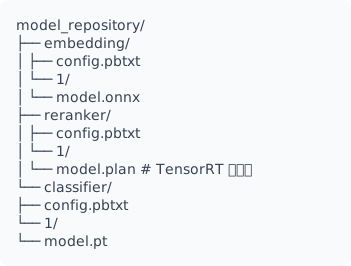
config.pbtxt 예시 (Embedding):
name: "embedding"
platform: "onnxruntime_onnx"
max_batch_size: 64
input [
  {
    name: "input_ids"
    data_type: TYPE_INT64
    dims: [ -1 ]
  },
  {
    name: "attention_mask"
    data_type: TYPE_INT64
    dims: [ -1 ]
  }
]
output [
  {
    name: "embeddings"
    data_type: TYPE_FP32
    dims: [ 1024 ]
  }
]
instance_group [
  {
    count: 2
    kind: KIND_GPU
  }
]
dynamic_batching {
  preferred_batch_size: [ 16, 32, 64 ]
  max_queue_delay_microseconds: 100000
}
2.4 Redis Cluster
| 용도 | 데이터 구조 | TTL |
|---|---|---|
| 응답 캐시 | String (JSON) | 1-24시간 |
| 세션 관리 | Hash | 30분 |
| Rate Limit | Sorted Set | 1분 |
| 대화 히스토리 | List | 24시간 |
클러스터 구성:
캐시 키 설계:
# 응답 캐시
chat:response:{hash(prompt + context)}

# 세션
session:{user_id}:{session_id}

# Rate Limit
ratelimit:{user_id}:{window}

# 대화 히스토리
history:{conversation_id}
2.5 Elasticsearch (Vector Search)
| 항목 | 권장 값 | 비고 |
|---|---|---|
| 노드 수 | 3+ | HA 구성 |
| Shard 수 | 인덱스당 3-5 | 데이터 크기에 따라 |
| Replica | 1 | 가용성 확보 |
| Heap | 32GB 이하 | JVM GC 최적화 |
인덱스 매핑 예시:
{
  "mappings": {
    "properties": {
      "content": {
        "type": "text",
        "analyzer": "nori"
      },
      "embedding": {
        "type": "dense_vector",
        "dims": 1024,
        "index": true,
        "similarity": "cosine"
      },
      "metadata": {
        "type": "object",
        "properties": {
          "source": { "type": "keyword" },
          "category": { "type": "keyword" },
          "timestamp": { "type": "date" }
        }
      }
    }
  }
}
3. Docker Compose 구성
3.1 개발/스테이징 환경
version: '3.8'

services:
  # API Server
  api:
    build:
      context: .
      dockerfile: Dockerfile.api
    ports:
      - "8080:8080"
    environment:
      - VLLM_URL=http://vllm:8000
      - TRITON_URL=triton:8001
      - REDIS_URL=redis://redis:6379
      - ES_URL=http://elasticsearch:9200
    depends_on:
      - redis
      - elasticsearch
      - vllm
      - triton
    deploy:
      replicas: 2
      resources:
        limits:
          cpus: '4'
          memory: 8G

  # vLLM Server
  vllm:
    image: vllm/vllm-openai:latest
    ports:
      - "8000:8000"
    volumes:
      - ./models:/models
      - ./cache:/root/.cache
    environment:
      - CUDA_VISIBLE_DEVICES=0,1
    command: >
      --model /models/llama-3.1-8b-instruct
      --tensor-parallel-size 2
      --max-model-len 8192
      --gpu-memory-utilization 0.9
    deploy:
      resources:
        reservations:
          devices:
            - driver: nvidia
              count: 2
              capabilities: [gpu]

  # Triton Inference Server
  triton:
    image: nvcr.io/nvidia/tritonserver:24.01-py3
    ports:
      - "8001:8001"  # gRPC
      - "8002:8002"  # Metrics
    volumes:
      - ./model_repository:/models
    command: >
      tritonserver
      --model-repository=/models
      --strict-model-config=false
      --log-verbose=1
    deploy:
      resources:
        reservations:
          devices:
            - driver: nvidia
              count: 1
              capabilities: [gpu]

  # Redis
  redis:
    image: redis:7-alpine
    ports:
      - "6379:6379"
    volumes:
      - redis_data:/data
    command: redis-server --appendonly yes --maxmemory 2gb --maxmemory-policy allkeys-lru

  # Elasticsearch
  elasticsearch:
    image: docker.elastic.co/elasticsearch/elasticsearch:8.11.0
    ports:
      - "9200:9200"
    environment:
      - discovery.type=single-node
      - xpack.security.enabled=false
      - "ES_JAVA_OPTS=-Xms4g -Xmx4g"
    volumes:
      - es_data:/usr/share/elasticsearch/data

  # Prometheus
  prometheus:
    image: prom/prometheus:latest
    ports:
      - "9090:9090"
    volumes:
      - ./prometheus.yml:/etc/prometheus/prometheus.yml
      - prometheus_data:/prometheus

  # Grafana
  grafana:
    image: grafana/grafana:latest
    ports:
      - "3000:3000"
    volumes:
      - grafana_data:/var/lib/grafana
      - ./grafana/dashboards:/etc/grafana/provisioning/dashboards

volumes:
  redis_data:
  es_data:
  prometheus_data:
  grafana_data:
3.2 프로덕션 환경 (Kubernetes 권장)
프로덕션에서는 Docker Compose 대신 Kubernetes를 권장함.
핵심 리소스: - Deployment: API 서버, 무상태 워커 - StatefulSet: Elasticsearch, Redis Cluster - DaemonSet: 로그 수집기 (Fluent Bit) - HPA: API 서버 오토스케일링 - PDB: 가용성 보장
4. 스케일링 전략
4.1 수평 확장 (Horizontal Scaling)
| 컴포넌트 | 스케일링 방식 | 트리거 조건 |
|---|---|---|
| API Server | HPA | CPU > 70%, RPS > threshold |
| vLLM | 수동/예약 | GPU 사용률 > 80% |
| Triton | HPA (GPU) | 큐 대기 시간 > 100ms |
| Redis | 샤딩 추가 | 메모리 > 80% |
| ES | 노드 추가 | 디스크 > 75% |
4.2 수직 확장 (Vertical Scaling)
vLLM 성능 향상 경로:
A10G (24GB) -> A100 (40GB) -> A100 (80GB) -> H100 (80GB)
     |              |              |              |
   7B 모델      13B 모델       70B 모델      70B + 긴 컨텍스트
4.3 배치 최적화
# 동적 배치 설정
BATCH_CONFIG = {
    "max_batch_size": 32,
    "max_wait_time_ms": 50,
    "preferred_batch_sizes": [8, 16, 32],
}

# 요청 큐잉 전략
async def batch_inference(requests: list[Request]):
    """
    요청을 배치로 모아 처리.
    latency vs throughput 트레이드오프 조절.
    """
    batch = []
    deadline = time.time() + BATCH_CONFIG["max_wait_time_ms"] / 1000

    while len(batch) < BATCH_CONFIG["max_batch_size"]:
        if time.time() > deadline:
            break
        try:
            req = await asyncio.wait_for(
                request_queue.get(),
                timeout=deadline - time.time()
            )
            batch.append(req)
        except asyncio.TimeoutError:
            break

    return await process_batch(batch)
5. 모니터링 구성
5.1 메트릭 수집 체계
[Application] --> [Prometheus] --> [Grafana]
     |                 |
     |            [AlertManager]
     |                 |
     v                 v
[OpenTelemetry] --> [Jaeger]    [PagerDuty/Slack]
5.2 핵심 메트릭
| 카테고리 | 메트릭 | 임계값 | 알림 레벨 |
|---|---|---|---|
| Latency | p50, p95, p99 | p95 > 3s | Warning |
| Throughput | requests/sec | < 10 RPS | Critical |
| Error Rate | 5xx/total | > 1% | Critical |
| GPU | utilization, memory | > 95% | Warning |
| Cache | hit rate | < 70% | Warning |
| Queue | depth, wait time | depth > 100 | Warning |
5.3 Prometheus 설정
# prometheus.yml
global:
  scrape_interval: 15s
  evaluation_interval: 15s

rule_files:
  - "alerts/*.yml"

alerting:
  alertmanagers:
    - static_configs:
        - targets: ["alertmanager:9093"]

scrape_configs:
  - job_name: 'api'
    static_configs:
      - targets: ['api:8080']
    metrics_path: /metrics

  - job_name: 'vllm'
    static_configs:
      - targets: ['vllm:8000']
    metrics_path: /metrics

  - job_name: 'triton'
    static_configs:
      - targets: ['triton:8002']
    metrics_path: /metrics

  - job_name: 'redis'
    static_configs:
      - targets: ['redis-exporter:9121']

  - job_name: 'elasticsearch'
    static_configs:
      - targets: ['es-exporter:9114']
5.4 알림 규칙
# alerts/llm-alerts.yml
groups:
  - name: llm-service
    rules:
      - alert: HighLatency
        expr: histogram_quantile(0.95, rate(request_duration_seconds_bucket[5m])) > 3
        for: 5m
        labels:
          severity: warning
        annotations:
          summary: "High latency detected"
          description: "P95 latency is {{ $value }}s"

      - alert: HighErrorRate
        expr: rate(http_requests_total{status=~"5.."}[5m]) / rate(http_requests_total[5m]) > 0.01
        for: 2m
        labels:
          severity: critical
        annotations:
          summary: "High error rate"
          description: "Error rate is {{ $value | humanizePercentage }}"

      - alert: GPUMemoryHigh
        expr: nvidia_gpu_memory_used_bytes / nvidia_gpu_memory_total_bytes > 0.95
        for: 5m
        labels:
          severity: warning
        annotations:
          summary: "GPU memory usage high"

      - alert: VLLMQueueBacklog
        expr: vllm_num_requests_waiting > 50
        for: 2m
        labels:
          severity: warning
        annotations:
          summary: "vLLM request queue backlog"
5.5 Grafana 대시보드 구성
권장 패널:
- Overview
- 총 요청 수 (24h)
- 평균 응답 시간
- 에러율
-
활성 사용자 수
-
Inference Performance
- Token throughput (tokens/sec)
- Time to First Token (TTFT)
- Time Per Output Token (TPOT)
-
배치 크기 분포
-
Resource Utilization
- GPU 사용률 (per device)
- GPU 메모리 (used/total)
- CPU/Memory (API 서버)
-
네트워크 I/O
-
Cache & Search
- Redis hit/miss rate
- ES query latency
- ES indexing rate
6. 운영 체크리스트
6.1 배포 전
- [ ] 부하 테스트 완료 (목표 RPS의 2배)
- [ ] 장애 복구 시나리오 테스트
- [ ] 롤백 절차 문서화
- [ ] 모니터링 알림 설정
- [ ] 보안 점검 (인증, 암호화, 접근 제어)
6.2 운영 중
- [ ] 일일 메트릭 리뷰
- [ ] 주간 용량 계획 점검
- [ ] 월간 비용 최적화 검토
- [ ] 분기별 아키텍처 리뷰
6.3 장애 대응
1. 탐지 (Alert)
   |
2. 분류 (Severity 판단)
   |
3. 대응 (Runbook 실행)
   |
4. 복구 (서비스 정상화)
   |
5. 분석 (RCA 작성)
   |
6. 개선 (재발 방지)
부록: 참고 자료
| 주제 | 링크 |
|---|---|
| vLLM Documentation | https://docs.vllm.ai |
| Triton Inference Server | https://github.com/triton-inference-server |
| Prometheus Best Practices | https://prometheus.io/docs/practices |
| Kubernetes Patterns | https://k8spatterns.io |
문서 버전: 1.0 최종 수정: 2025-01