스트리밍 처리 (Streaming Processing)
실시간으로 데이터를 처리하는 시스템. 로그 분석, 실시간 모니터링, 이벤트 기반 아키텍처 등에 활용됨.
배치 vs 스트리밍
| 특성 | 배치 처리 | 스트리밍 처리 |
|---|---|---|
| 처리 시점 | 주기적 | 실시간 (연속) |
| 지연 시간 | 분~시간 | 밀리초~초 |
| 데이터 범위 | 전체 또는 증분 | 개별 이벤트/마이크로배치 |
| 복잡성 | 낮음 | 높음 |
| 상태 관리 | 단순 | 복잡 (분산 상태) |
| 용도 | 보고서, 학습 | 모니터링, 알림 |
| 정확성 | 정확 (재처리 용이) | At-least-once 또는 Exactly-once |
스트리밍이 필요한 상황
배치로 충분한 상황
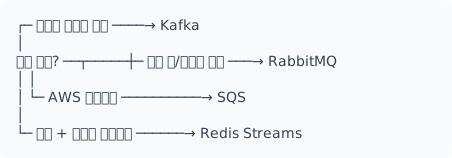
메시지 브로커 비교
| 브로커 | 처리량 | 지연 | 내구성 | 순서 보장 | 사용 사례 |
|---|---|---|---|---|---|
| Kafka | 매우 높음 | 밀리초 | 높음 | 파티션 내 | 이벤트 스트리밍 |
| RabbitMQ | 중간 | 마이크로초 | 중간 | 큐 내 | 작업 큐 |
| AWS SQS | 높음 | 밀리초 | 높음 | FIFO 옵션 | 클라우드 네이티브 |
| Redis Streams | 매우 높음 | 마이크로초 | 설정에 따라 | 스트림 내 | 캐시 + 스트리밍 |
| Pulsar | 매우 높음 | 밀리초 | 높음 | 파티션 내 | 멀티테넌트 |
메시지 브로커 선택 가이드
Apache Kafka
분산 이벤트 스트리밍 플랫폼의 사실상 표준.
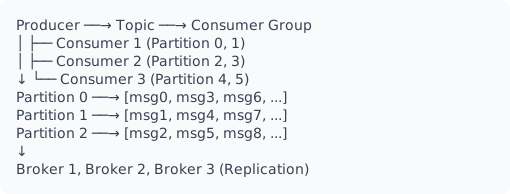
핵심 개념
| 개념 | 설명 |
|---|---|
| Topic | 메시지 카테고리 (로그 파일처럼 append-only) |
| Partition | 토픽의 병렬 처리 단위 (순서 보장 단위) |
| Producer | 메시지 발행자 |
| Consumer | 메시지 구독자 |
| Consumer Group | 소비자 그룹 (파티션 자동 분배) |
| Offset | 파티션 내 메시지 위치 (커밋으로 진행 상황 저장) |
| Broker | Kafka 서버 노드 |
| Replication Factor | 복제본 수 (내구성) |
Python Producer
from kafka import KafkaProducer
import json
from datetime import datetime

producer = KafkaProducer(
    bootstrap_servers=['localhost:9092'],
    value_serializer=lambda v: json.dumps(v).encode('utf-8'),
    key_serializer=lambda k: k.encode('utf-8') if k else None,
    acks='all',              # 모든 복제본 확인 (가장 안전)
    retries=3,               # 재시도 횟수
    retry_backoff_ms=100,    # 재시도 간격
    linger_ms=10,            # 배치 대기 시간 (처리량 vs 지연 트레이드오프)
    batch_size=16384,        # 배치 크기
    compression_type='gzip', # 압축 (lz4, snappy, zstd)
)

def send_event(topic: str, key: str, event: dict):
    """이벤트 전송 (비동기)"""
    event['timestamp'] = datetime.now().isoformat()

    future = producer.send(
        topic,
        key=key,      # 같은 키 → 같은 파티션 → 순서 보장
        value=event
    )

    # 동기 확인이 필요한 경우
    try:
        record_metadata = future.get(timeout=10)
        print(f"Sent to {record_metadata.topic}:{record_metadata.partition} "
              f"at offset {record_metadata.offset}")
    except Exception as e:
        print(f"Failed to send: {e}")

# 사용
send_event('user-events', 'user-123', {'action': 'click', 'page': '/home'})
producer.flush()  # 버퍼 플러시 (graceful shutdown 전 필수)
producer.close()
Python Consumer
from kafka import KafkaConsumer, OffsetAndMetadata, TopicPartition
import json

# 기본 Consumer (자동 커밋)
consumer = KafkaConsumer(
    'user-events',
    bootstrap_servers=['localhost:9092'],
    group_id='event-processor',
    auto_offset_reset='earliest',     # 또는 'latest'
    enable_auto_commit=True,          # 자동 오프셋 커밋
    auto_commit_interval_ms=5000,     # 5초마다 커밋
    value_deserializer=lambda v: json.loads(v.decode('utf-8')),
    max_poll_records=500,             # 한 번에 가져올 최대 레코드
    session_timeout_ms=30000,         # 세션 타임아웃
)

def process_events():
    """이벤트 스트림 처리"""
    for message in consumer:
        event = message.value

        print(f"Topic: {message.topic}")
        print(f"Partition: {message.partition}")
        print(f"Offset: {message.offset}")
        print(f"Key: {message.key}")
        print(f"Event: {event}")

        # 비즈니스 로직
        process_event(event)

# 수동 커밋 Consumer (Exactly-once에 가까운 처리)
consumer_manual = KafkaConsumer(
    'user-events',
    bootstrap_servers=['localhost:9092'],
    group_id='event-processor',
    enable_auto_commit=False,  # 수동 커밋
    value_deserializer=lambda v: json.loads(v.decode('utf-8'))
)

def process_with_manual_commit():
    """수동 커밋으로 정확한 처리 보장"""
    try:
        for message in consumer_manual:
            # 1. 처리
            process_event(message.value)

            # 2. 처리 완료 후 커밋
            consumer_manual.commit({
                TopicPartition(message.topic, message.partition):
                    OffsetAndMetadata(message.offset + 1, None)
            })
    except Exception as e:
        print(f"Error: {e}")
        # 커밋하지 않으면 재시작 시 다시 처리됨

# 배치 처리 + 커밋
def process_batch_with_commit():
    """배치 단위로 처리하고 커밋"""
    while True:
        records = consumer_manual.poll(timeout_ms=1000, max_records=100)

        for topic_partition, messages in records.items():
            for message in messages:
                process_event(message.value)

        # 배치 처리 완료 후 커밋
        if records:
            consumer_manual.commit()
메시지 전달 보장
| 보장 수준 | 설명 | 구현 방법 |
|---|---|---|
| At-most-once | 최대 1번 (손실 가능) | 처리 전 커밋 |
| At-least-once | 최소 1번 (중복 가능) | 처리 후 커밋 |
| Exactly-once | 정확히 1번 | Idempotent Producer + 트랜잭션 |
# Exactly-once Producer (Kafka 0.11+)
producer = KafkaProducer(
    bootstrap_servers=['localhost:9092'],
    enable_idempotence=True,  # 멱등성 활성화
    acks='all',
    retries=5,
    max_in_flight_requests_per_connection=5,  # 멱등성 활성화 시 최대 5
    transactional_id='my-transactional-id',   # 트랜잭션 ID
)

# 트랜잭션 사용
producer.init_transactions()

try:
    producer.begin_transaction()

    producer.send('topic-a', value=b'message-1')
    producer.send('topic-b', value=b'message-2')

    producer.commit_transaction()
except Exception as e:
    producer.abort_transaction()
    raise
Consumer Group 리밸런싱
from kafka import KafkaConsumer, ConsumerRebalanceListener

class MyRebalanceListener(ConsumerRebalanceListener):
    def __init__(self, consumer):
        self.consumer = consumer

    def on_partitions_revoked(self, revoked):
        """파티션 해제 전 호출 (커밋 기회)"""
        print(f"Partitions revoked: {revoked}")
        self.consumer.commit()  # 진행 상황 저장

    def on_partitions_assigned(self, assigned):
        """새 파티션 할당 후 호출"""
        print(f"Partitions assigned: {assigned}")
        # 필요시 특정 오프셋에서 시작
        # for tp in assigned:
        #     self.consumer.seek(tp, 0)  # 처음부터

consumer = KafkaConsumer(
    bootstrap_servers=['localhost:9092'],
    group_id='my-group'
)

listener = MyRebalanceListener(consumer)
consumer.subscribe(['my-topic'], listener=listener)
스트림 처리 프레임워크
Kafka Streams (via Faust - Python)
import faust

app = faust.App(
    'user-metrics',
    broker='kafka://localhost:9092',
    value_serializer='json',
    store='rocksdb://',  # 로컬 상태 저장소
)

# 입력 토픽
class UserEvent(faust.Record):
    user_id: str
    action: str
    timestamp: float

user_events = app.topic('user-events', value_type=UserEvent)

# 상태 테이블 (윈도우 집계)
action_counts = app.Table(
    'action_counts',
    default=int,
    partitions=8,
).tumbling(size=60, expires=3600)  # 1분 텀블링 윈도우

@app.agent(user_events)
async def process_events(stream):
    """스트림 처리 에이전트"""
    async for event in stream:
        # 윈도우 집계
        action_counts[event.user_id] += 1

        # 실시간 알림
        if action_counts[event.user_id] > 100:
            await send_alert(f"High activity: {event.user_id}")

@app.timer(interval=60.0)
async def report_metrics():
    """주기적 메트릭 리포트"""
    for user_id, count in action_counts.items():
        print(f"User {user_id}: {count} actions in last minute")

if __name__ == '__main__':
    app.main()
Apache Spark Structured Streaming
from pyspark.sql import SparkSession
from pyspark.sql.functions import *
from pyspark.sql.types import *

spark = SparkSession.builder \
    .appName("Streaming Analytics") \
    .getOrCreate()

# 스키마 정의
schema = StructType([
    StructField("user_id", StringType()),
    StructField("action", StringType()),
    StructField("timestamp", TimestampType()),
    StructField("properties", MapType(StringType(), StringType()))
])

# Kafka에서 읽기
df = spark.readStream \
    .format("kafka") \
    .option("kafka.bootstrap.servers", "localhost:9092") \
    .option("subscribe", "user-events") \
    .option("startingOffsets", "latest") \
    .option("maxOffsetsPerTrigger", 10000) \
    .load()

# JSON 파싱
parsed = df.select(
    from_json(col("value").cast("string"), schema).alias("data"),
    col("timestamp").alias("kafka_timestamp")
).select("data.*", "kafka_timestamp")

# 윈도우 집계
windowed = parsed \
    .withWatermark("timestamp", "10 seconds") \
    .groupBy(
        window("timestamp", "1 minute", "30 seconds"),  # 1분 윈도우, 30초 슬라이드
        "action"
    ) \
    .agg(
        count("*").alias("event_count"),
        approx_count_distinct("user_id").alias("unique_users")
    )

# 콘솔 출력 (디버깅)
query = windowed.writeStream \
    .outputMode("update") \
    .format("console") \
    .option("truncate", False) \
    .trigger(processingTime="10 seconds") \
    .start()

# Kafka로 출력
query = windowed.selectExpr(
    "CAST(window AS STRING) as key",
    "to_json(struct(*)) as value"
).writeStream \
    .format("kafka") \
    .option("kafka.bootstrap.servers", "localhost:9092") \
    .option("topic", "user-metrics") \
    .option("checkpointLocation", "/checkpoint/user-metrics") \
    .outputMode("update") \
    .start()

query.awaitTermination()
Apache Flink
# PyFlink
from pyflink.datastream import StreamExecutionEnvironment
from pyflink.table import StreamTableEnvironment, EnvironmentSettings

env = StreamExecutionEnvironment.get_execution_environment()
env.set_parallelism(4)

settings = EnvironmentSettings.new_instance().in_streaming_mode().build()
t_env = StreamTableEnvironment.create(env, environment_settings=settings)

# Kafka Source 정의
t_env.execute_sql("""
    CREATE TABLE user_events (
        user_id STRING,
        action STRING,
        event_time TIMESTAMP(3),
        WATERMARK FOR event_time AS event_time - INTERVAL '5' SECOND
    ) WITH (
        'connector' = 'kafka',
        'topic' = 'user-events',
        'properties.bootstrap.servers' = 'localhost:9092',
        'properties.group.id' = 'flink-consumer',
        'scan.startup.mode' = 'latest-offset',
        'format' = 'json'
    )
""")

# 윈도우 집계 쿼리
t_env.execute_sql("""
    SELECT
        TUMBLE_START(event_time, INTERVAL '1' MINUTE) as window_start,
        action,
        COUNT(*) as event_count,
        COUNT(DISTINCT user_id) as unique_users
    FROM user_events
    GROUP BY
        TUMBLE(event_time, INTERVAL '1' MINUTE),
        action
""").print()
윈도우 연산
윈도우 유형
Tumbling Window (고정 크기, 겹침 없음)
|-------|-------|-------|-------|
   1분      1분      1분      1분

Sliding Window (고정 크기, 겹침 있음)
|-------|
    |-------|
        |-------|
   1분 윈도우, 30초 슬라이드

Session Window (활동 기반)
|--활동--|  |-----활동-----|  |--활동--|
   세션1         세션2          세션3
   (갭: 비활동 시간으로 세션 구분)
# Spark: 윈도우 예시
from pyspark.sql.functions import window

# Tumbling Window
df.groupBy(
    window("timestamp", "1 minute")
).count()

# Sliding Window
df.groupBy(
    window("timestamp", "1 minute", "30 seconds")  # 1분 윈도우, 30초 슬라이드
).count()

# Session Window (Spark 3.2+)
df.groupBy(
    session_window("timestamp", "5 minutes")  # 5분 갭
).count()
Watermark와 Late Data
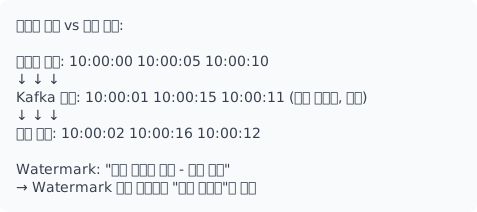
# Watermark 설정
df.withWatermark("event_time", "10 seconds")

# 늦은 데이터 처리
df.writeStream \
    .outputMode("append") \
    .option("spark.sql.streaming.stateStore.stateSchemaCheck", "false") \
    .start()

# 늦은 데이터 별도 처리 (Flink)
# Side Output으로 늦은 데이터 분리
장애 복구와 Exactly-Once
Checkpoint와 State
# Spark Streaming Checkpoint
query = df.writeStream \
    .format("parquet") \
    .option("checkpointLocation", "/checkpoint/my-app") \
    .option("path", "/output/data") \
    .start()

# 재시작 시 자동으로 체크포인트에서 복구
Kafka Consumer 장애 복구
import json
from pathlib import Path

class CheckpointedConsumer:
    """체크포인트 기반 컨슈머"""

    def __init__(self, consumer, checkpoint_path):
        self.consumer = consumer
        self.checkpoint_path = Path(checkpoint_path)
        self.offsets = {}

    def load_checkpoint(self):
        """체크포인트 로드"""
        if self.checkpoint_path.exists():
            with open(self.checkpoint_path) as f:
                self.offsets = json.load(f)

            # 저장된 오프셋에서 시작
            for tp_str, offset in self.offsets.items():
                topic, partition = tp_str.rsplit('-', 1)
                tp = TopicPartition(topic, int(partition))
                self.consumer.seek(tp, offset)

    def save_checkpoint(self):
        """체크포인트 저장"""
        with open(self.checkpoint_path, 'w') as f:
            json.dump(self.offsets, f)

    def process_and_checkpoint(self, process_func, batch_size=100):
        """배치 처리 후 체크포인트"""
        self.load_checkpoint()

        count = 0
        for message in self.consumer:
            process_func(message)

            tp_str = f"{message.topic}-{message.partition}"
            self.offsets[tp_str] = message.offset + 1
            count += 1

            if count >= batch_size:
                self.save_checkpoint()
                count = 0
멱등성 처리
import hashlib
from functools import lru_cache

class IdempotentProcessor:
    """멱등성 보장 프로세서"""

    def __init__(self, redis_client):
        self.redis = redis_client
        self.ttl = 86400  # 24시간

    def get_message_id(self, message):
        """메시지 고유 ID 생성"""
        # Kafka: topic + partition + offset
        return f"{message.topic}:{message.partition}:{message.offset}"

    def is_processed(self, message_id):
        """이미 처리된 메시지인지 확인"""
        return self.redis.exists(f"processed:{message_id}")

    def mark_processed(self, message_id):
        """처리 완료 마킹"""
        self.redis.setex(f"processed:{message_id}", self.ttl, "1")

    def process(self, message, process_func):
        """멱등성 보장 처리"""
        message_id = self.get_message_id(message)

        if self.is_processed(message_id):
            print(f"Skip duplicate: {message_id}")
            return

        try:
            result = process_func(message)
            self.mark_processed(message_id)
            return result
        except Exception as e:
            # 실패 시 마킹하지 않음 → 재처리 가능
            raise
실시간 모니터링 시스템
import asyncio
from dataclasses import dataclass, field
from collections import defaultdict
import time

@dataclass
class MetricWindow:
    count: int = 0
    sum_value: float = 0
    max_value: float = float('-inf')
    min_value: float = float('inf')

    def add(self, value: float):
        self.count += 1
        self.sum_value += value
        self.max_value = max(self.max_value, value)
        self.min_value = min(self.min_value, value)

    @property
    def avg(self):
        return self.sum_value / self.count if self.count > 0 else 0

class RealtimeMetrics:
    """실시간 메트릭 수집"""

    def __init__(self, window_seconds=60):
        self.window_seconds = window_seconds
        self.metrics = defaultdict(lambda: defaultdict(MetricWindow))
        self.alerts = []

    def get_window_key(self):
        return int(time.time() // self.window_seconds)

    def record(self, metric_name: str, dimension: str, value: float):
        """메트릭 기록"""
        window = self.get_window_key()
        self.metrics[window][f"{metric_name}:{dimension}"].add(value)

        # 실시간 알림 체크
        self._check_alert(metric_name, dimension, value)

    def _check_alert(self, metric_name: str, dimension: str, value: float):
        """알림 조건 체크"""
        if metric_name == 'latency' and value > 5000:
            self.alerts.append({
                'type': 'high_latency',
                'metric': metric_name,
                'dimension': dimension,
                'value': value,
                'timestamp': time.time()
            })

    def get_current_metrics(self):
        """현재 윈도우 메트릭"""
        window = self.get_window_key()
        return {
            key: {
                'count': m.count,
                'avg': m.avg,
                'max': m.max_value,
                'min': m.min_value
            }
            for key, m in self.metrics[window].items()
        }

    def cleanup(self, keep_windows=10):
        """오래된 윈도우 정리"""
        current = self.get_window_key()
        old = [k for k in self.metrics.keys() if k < current - keep_windows]
        for k in old:
            del self.metrics[k]

# 사용
metrics = RealtimeMetrics(window_seconds=60)

async def process_request(request):
    start = time.time()
    try:
        response = await handle(request)
        latency = (time.time() - start) * 1000

        metrics.record('latency', request.endpoint, latency)
        metrics.record('requests', request.endpoint, 1)

        return response
    except Exception as e:
        metrics.record('errors', request.endpoint, 1)
        raise
아키텍처 패턴
Lambda 아키텍처
배치 + 스트리밍 결합 (정확성 + 실시간).
            +----------------+
            |   Raw Data     |
            +-------+--------+
                    |
        +-----------+-----------+
        |                       |
        v                       v
+-------+-------+       +-------+-------+
|  Batch Layer  |       | Speed Layer   |
|  (정확, 느림)  |       | (근사, 빠름)   |
+-------+-------+       +-------+-------+
        |                       |
        +----------+------------+
                   |
                   v
           +-------+-------+
           | Serving Layer |
           | (Query 통합)   |
           +---------------+
Kappa 아키텍처
스트리밍만 사용 (단순화).
Raw Data --> Kafka --> Stream Processing --> Serving Layer
                |
                v
        Kafka (재처리용 보존)

* 재처리 필요시: 같은 스트리밍 로직으로 Kafka 리플레이
선택 기준
| 기준 | Lambda | Kappa |
|---|---|---|
| 복잡도 | 높음 (두 경로 유지) | 낮음 (단일 경로) |
| 정확성 | 배치로 보정 가능 | 스트리밍 의존 |
| 재처리 | 배치로 간단 | Kafka 리플레이 |
| 비용 | 높음 | 낮음 |
| 적합 | 정확성 중요, 복잡한 분석 | 실시간 중심, 단순한 변환 |
참고 자료
- Apache Kafka Documentation
- Spark Structured Streaming
- Apache Flink Documentation
- Designing Event-Driven Systems - Ben Stopford
- Making Sense of Stream Processing - Martin Kleppmann
- Streaming Systems - Tyler Akidau