CI/CD for ML
ML 프로젝트에서 코드, 데이터, 모델의 지속적 통합(CI)과 지속적 배포(CD)를 구현하는 방법.
1. ML CI/CD 특성
1.1 전통적 CI/CD vs ML CI/CD
| 항목 | 전통적 CI/CD | ML CI/CD |
|---|---|---|
| 테스트 대상 | 코드 | 코드 + 데이터 + 모델 |
| 빌드 결과물 | 바이너리/컨테이너 | 모델 아티팩트 |
| 테스트 시간 | 분 단위 | 시간~일 단위 |
| 검증 기준 | 테스트 통과 | 테스트 + 성능 메트릭 |
| 롤백 | 이전 버전 배포 | 이전 모델 배포 |
1.2 ML CI/CD 파이프라인 구성
[Code Change]     [Data Change]     [Schedule]
      |                 |               |
      v                 v               v
+--------------------------------------------------+
|                  CI Pipeline                      |
+--------------------------------------------------+
| 1. Code Lint & Format Check                      |
| 2. Unit Tests                                    |
| 3. Data Validation                               |
| 4. Feature Engineering Tests                     |
| 5. Model Training (Subset)                       |
| 6. Model Evaluation                              |
+--------------------------------------------------+
                      |
                      v
+--------------------------------------------------+
|                  CD Pipeline                      |
+--------------------------------------------------+
| 1. Full Model Training                           |
| 2. Model Registry Registration                   |
| 3. Staging Deployment                            |
| 4. Integration Tests                             |
| 5. Performance Tests                             |
| 6. Production Deployment                         |
+--------------------------------------------------+
2. CI 파이프라인 구현
2.1 GitHub Actions 기본 구조
# .github/workflows/ml-ci.yml
name: ML CI Pipeline

on:
  push:
    branches: [main, develop]
  pull_request:
    branches: [main]
  schedule:
    - cron: '0 2 * * *'  # 매일 새벽 2시

env:
  PYTHON_VERSION: '3.10'
  MLFLOW_TRACKING_URI: ${{ secrets.MLFLOW_TRACKING_URI }}

jobs:
  lint-and-format:
    runs-on: ubuntu-latest
    steps:
      - uses: actions/checkout@v4

      - name: Set up Python
        uses: actions/setup-python@v5
        with:
          python-version: ${{ env.PYTHON_VERSION }}

      - name: Install dependencies
        run: |
          pip install ruff black isort mypy

      - name: Run linters
        run: |
          ruff check src/
          black --check src/
          isort --check-only src/
          mypy src/ --ignore-missing-imports

  unit-tests:
    runs-on: ubuntu-latest
    needs: lint-and-format
    steps:
      - uses: actions/checkout@v4

      - name: Set up Python
        uses: actions/setup-python@v5
        with:
          python-version: ${{ env.PYTHON_VERSION }}

      - name: Install dependencies
        run: pip install -r requirements.txt -r requirements-test.txt

      - name: Run unit tests
        run: pytest tests/unit/ -v --cov=src --cov-report=xml

      - name: Upload coverage
        uses: codecov/codecov-action@v3
        with:
          files: ./coverage.xml

  data-validation:
    runs-on: ubuntu-latest
    needs: lint-and-format
    steps:
      - uses: actions/checkout@v4

      - name: Set up Python
        uses: actions/setup-python@v5
        with:
          python-version: ${{ env.PYTHON_VERSION }}

      - name: Install dependencies
        run: pip install -r requirements.txt great_expectations

      - name: Pull data
        env:
          AWS_ACCESS_KEY_ID: ${{ secrets.AWS_ACCESS_KEY_ID }}
          AWS_SECRET_ACCESS_KEY: ${{ secrets.AWS_SECRET_ACCESS_KEY }}
        run: dvc pull data/sample/

      - name: Run data validation
        run: python scripts/validate_data.py

  model-training-test:
    runs-on: ubuntu-latest
    needs: [unit-tests, data-validation]
    steps:
      - uses: actions/checkout@v4

      - name: Set up Python
        uses: actions/setup-python@v5
        with:
          python-version: ${{ env.PYTHON_VERSION }}

      - name: Install dependencies
        run: pip install -r requirements.txt

      - name: Pull sample data
        env:
          AWS_ACCESS_KEY_ID: ${{ secrets.AWS_ACCESS_KEY_ID }}
          AWS_SECRET_ACCESS_KEY: ${{ secrets.AWS_SECRET_ACCESS_KEY }}
        run: dvc pull data/sample/

      - name: Train model (subset)
        run: |
          python src/train.py \
            --data-path data/sample/ \
            --max-epochs 2 \
            --experiment-name ci-test

      - name: Evaluate model
        run: python src/evaluate.py --model-path models/model.pkl
2.2 데이터 검증 스크립트
# scripts/validate_data.py
import great_expectations as gx
import pandas as pd
import sys

def validate_training_data():
    """학습 데이터 검증"""
    # Context 생성
    context = gx.get_context()

    # 데이터 로드
    df = pd.read_parquet("data/sample/train.parquet")

    # Expectation Suite 생성
    suite = context.add_expectation_suite("training_data_suite")

    # 기대값 정의
    expectations = [
        # 행 수 검증
        gx.expectations.ExpectTableRowCountToBeBetween(min_value=1000, max_value=1000000),

        # 필수 컬럼 존재
        gx.expectations.ExpectTableColumnsToMatchSet(
            column_set=["feature1", "feature2", "feature3", "target"]
        ),

        # 결측값 검증
        gx.expectations.ExpectColumnValuesToNotBeNull(column="target"),

        # 값 범위 검증
        gx.expectations.ExpectColumnValuesToBeBetween(
            column="feature1", min_value=0, max_value=100
        ),

        # 고유값 검증
        gx.expectations.ExpectColumnDistinctValuesToBeInSet(
            column="category", value_set=["A", "B", "C", "D"]
        ),
    ]

    # Validator 생성 및 검증
    validator = context.get_validator(
        batch_request=...,
        expectation_suite=suite,
    )

    results = validator.validate()

    if not results.success:
        print("Data validation failed!")
        for result in results.results:
            if not result.success:
                print(f"  - {result.expectation_config.expectation_type}: FAILED")
        sys.exit(1)

    print("Data validation passed!")

if __name__ == "__main__":
    validate_training_data()
2.3 모델 테스트
# tests/unit/test_model.py
import pytest
import numpy as np
import pandas as pd
from src.model import ModelTrainer, ModelPredictor

class TestModelTrainer:
    @pytest.fixture
    def sample_data(self):
        np.random.seed(42)
        X = pd.DataFrame({
            'feature1': np.random.randn(100),
            'feature2': np.random.randn(100),
        })
        y = (X['feature1'] + X['feature2'] > 0).astype(int)
        return X, y

    def test_trainer_initialization(self):
        trainer = ModelTrainer(n_estimators=10)
        assert trainer.model is not None

    def test_training_basic(self, sample_data):
        X, y = sample_data
        trainer = ModelTrainer(n_estimators=10)
        trainer.fit(X, y)
        assert trainer.is_fitted

    def test_prediction_shape(self, sample_data):
        X, y = sample_data
        trainer = ModelTrainer(n_estimators=10)
        trainer.fit(X, y)
        predictions = trainer.predict(X)
        assert len(predictions) == len(X)

    def test_prediction_values(self, sample_data):
        X, y = sample_data
        trainer = ModelTrainer(n_estimators=10)
        trainer.fit(X, y)
        predictions = trainer.predict(X)
        assert all(p in [0, 1] for p in predictions)

class TestModelPredictor:
    def test_load_model(self, tmp_path):
        # 모델 저장 후 로드 테스트
        model_path = tmp_path / "model.pkl"
        trainer = ModelTrainer(n_estimators=10)
        trainer.save(model_path)

        predictor = ModelPredictor(model_path)
        assert predictor.model is not None

    def test_prediction_latency(self, sample_data):
        import time
        X, y = sample_data
        trainer = ModelTrainer(n_estimators=10)
        trainer.fit(X, y)

        start = time.time()
        for _ in range(100):
            trainer.predict(X.iloc[[0]])
        elapsed = time.time() - start

        avg_latency = elapsed / 100
        assert avg_latency < 0.1  # 100ms 이하


# tests/integration/test_pipeline.py
def test_end_to_end_pipeline():
    """E2E 파이프라인 테스트"""
    from src.pipeline import run_pipeline

    result = run_pipeline(
        data_path="data/sample/",
        config_path="configs/test.yaml",
    )

    assert result["status"] == "success"
    assert result["metrics"]["accuracy"] > 0.5  # 최소 기준
    assert "model_path" in result
3. CD 파이프라인 구현
3.1 프로덕션 배포 워크플로우
# .github/workflows/ml-cd.yml
name: ML CD Pipeline

on:
  workflow_run:
    workflows: ["ML CI Pipeline"]
    types: [completed]
    branches: [main]

jobs:
  full-training:
    if: ${{ github.event.workflow_run.conclusion == 'success' }}
    runs-on: [self-hosted, gpu]
    steps:
      - uses: actions/checkout@v4

      - name: Set up Python
        uses: actions/setup-python@v5
        with:
          python-version: '3.10'

      - name: Install dependencies
        run: pip install -r requirements.txt

      - name: Pull full dataset
        env:
          AWS_ACCESS_KEY_ID: ${{ secrets.AWS_ACCESS_KEY_ID }}
          AWS_SECRET_ACCESS_KEY: ${{ secrets.AWS_SECRET_ACCESS_KEY }}
        run: dvc pull

      - name: Train full model
        env:
          MLFLOW_TRACKING_URI: ${{ secrets.MLFLOW_TRACKING_URI }}
        run: |
          python src/train.py \
            --data-path data/train/ \
            --experiment-name production \
            --register-model

      - name: Save run ID
        run: echo "RUN_ID=$(cat run_id.txt)" >> $GITHUB_OUTPUT
        id: training

  staging-deployment:
    needs: full-training
    runs-on: ubuntu-latest
    steps:
      - uses: actions/checkout@v4

      - name: Deploy to staging
        env:
          KUBECONFIG: ${{ secrets.KUBECONFIG_STAGING }}
        run: |
          MODEL_VERSION=${{ needs.full-training.outputs.run_id }}
          envsubst < k8s/staging/deployment.yaml | kubectl apply -f -

      - name: Wait for deployment
        run: kubectl rollout status deployment/ml-model -n staging --timeout=300s

      - name: Run integration tests
        run: |
          pip install pytest requests
          pytest tests/integration/ -v --base-url=https://staging.api.example.com

  performance-tests:
    needs: staging-deployment
    runs-on: ubuntu-latest
    steps:
      - uses: actions/checkout@v4

      - name: Install k6
        run: |
          sudo gpg -k
          sudo gpg --no-default-keyring --keyring /usr/share/keyrings/k6-archive-keyring.gpg --keyserver hkp://keyserver.ubuntu.com:80 --recv-keys C5AD17C747E3415A3642D57D77C6C491D6AC1D69
          echo "deb [signed-by=/usr/share/keyrings/k6-archive-keyring.gpg] https://dl.k6.io/deb stable main" | sudo tee /etc/apt/sources.list.d/k6.list
          sudo apt-get update
          sudo apt-get install k6

      - name: Run load tests
        run: k6 run tests/performance/load_test.js

      - name: Check latency requirements
        run: python scripts/check_latency.py --threshold-p95=500

  production-deployment:
    needs: performance-tests
    runs-on: ubuntu-latest
    environment:
      name: production
      url: https://api.example.com
    steps:
      - uses: actions/checkout@v4

      - name: Promote model to production
        env:
          MLFLOW_TRACKING_URI: ${{ secrets.MLFLOW_TRACKING_URI }}
        run: |
          python scripts/promote_model.py \
            --model-name production-model \
            --from-stage Staging \
            --to-stage Production

      - name: Deploy to production
        env:
          KUBECONFIG: ${{ secrets.KUBECONFIG_PRODUCTION }}
        run: |
          kubectl apply -f k8s/production/deployment.yaml
          kubectl rollout status deployment/ml-model -n production --timeout=600s

      - name: Canary verification
        run: |
          # 10분간 에러율 모니터링
          python scripts/canary_check.py --duration=600 --error-threshold=0.01

      - name: Full rollout
        env:
          KUBECONFIG: ${{ secrets.KUBECONFIG_PRODUCTION }}
        run: |
          kubectl scale deployment/ml-model -n production --replicas=10
3.2 모델 프로모션 스크립트
# scripts/promote_model.py
import mlflow
from mlflow.tracking import MlflowClient
import argparse

def promote_model(model_name: str, from_stage: str, to_stage: str):
    """모델을 다음 스테이지로 프로모션"""
    client = MlflowClient()

    # 현재 스테이지의 모델 버전 찾기
    versions = client.get_latest_versions(model_name, stages=[from_stage])

    if not versions:
        raise ValueError(f"No model found in stage: {from_stage}")

    latest_version = versions[0]

    # 성능 검증
    run = client.get_run(latest_version.run_id)
    accuracy = run.data.metrics.get("accuracy", 0)

    MINIMUM_ACCURACY = 0.85
    if accuracy < MINIMUM_ACCURACY:
        raise ValueError(f"Model accuracy {accuracy} below threshold {MINIMUM_ACCURACY}")

    # 스테이지 전환
    client.transition_model_version_stage(
        name=model_name,
        version=latest_version.version,
        stage=to_stage,
        archive_existing_versions=True,
    )

    print(f"Promoted {model_name} v{latest_version.version} from {from_stage} to {to_stage}")
    print(f"Accuracy: {accuracy}")

if __name__ == "__main__":
    parser = argparse.ArgumentParser()
    parser.add_argument("--model-name", required=True)
    parser.add_argument("--from-stage", required=True)
    parser.add_argument("--to-stage", required=True)
    args = parser.parse_args()

    promote_model(args.model_name, args.from_stage, args.to_stage)
3.3 성능 테스트 (k6)
// tests/performance/load_test.js
import http from 'k6/http';
import { check, sleep } from 'k6';
import { Rate, Trend } from 'k6/metrics';

const errorRate = new Rate('errors');
const latencyTrend = new Trend('latency');

export const options = {
  stages: [
    { duration: '1m', target: 10 },   // Ramp up
    { duration: '3m', target: 50 },   // Stay at 50
    { duration: '1m', target: 100 },  // Spike
    { duration: '2m', target: 50 },   // Back to normal
    { duration: '1m', target: 0 },    // Ramp down
  ],
  thresholds: {
    http_req_duration: ['p(95)<500'],  // P95 < 500ms
    errors: ['rate<0.01'],              // Error rate < 1%
  },
};

const BASE_URL = __ENV.BASE_URL || 'https://staging.api.example.com';

export default function () {
  const payload = JSON.stringify({
    features: [0.5, 0.3, 0.8, 0.2, 0.6],
  });

  const params = {
    headers: {
      'Content-Type': 'application/json',
      'Authorization': `Bearer ${__ENV.API_TOKEN}`,
    },
  };

  const res = http.post(`${BASE_URL}/predict`, payload, params);

  const success = check(res, {
    'status is 200': (r) => r.status === 200,
    'response has prediction': (r) => JSON.parse(r.body).prediction !== undefined,
    'latency < 500ms': (r) => r.timings.duration < 500,
  });

  errorRate.add(!success);
  latencyTrend.add(res.timings.duration);

  sleep(1);
}
4. 배포 전략
4.1 Blue-Green 배포
# k8s/production/blue-green.yaml
apiVersion: v1
kind: Service
metadata:
  name: ml-model
spec:
  selector:
    app: ml-model
    version: blue  # 또는 green으로 전환
  ports:
    - port: 80
      targetPort: 8000
---
apiVersion: apps/v1
kind: Deployment
metadata:
  name: ml-model-blue
spec:
  replicas: 5
  selector:
    matchLabels:
      app: ml-model
      version: blue
  template:
    metadata:
      labels:
        app: ml-model
        version: blue
    spec:
      containers:
        - name: ml-model
          image: ml-model:v1.0
          ports:
            - containerPort: 8000
---
apiVersion: apps/v1
kind: Deployment
metadata:
  name: ml-model-green
spec:
  replicas: 5
  selector:
    matchLabels:
      app: ml-model
      version: green
  template:
    metadata:
      labels:
        app: ml-model
        version: green
    spec:
      containers:
        - name: ml-model
          image: ml-model:v2.0
          ports:
            - containerPort: 8000
4.2 Canary 배포
# Istio를 이용한 Canary 배포
apiVersion: networking.istio.io/v1alpha3
kind: VirtualService
metadata:
  name: ml-model
spec:
  hosts:
    - ml-model
  http:
    - match:
        - headers:
            canary:
              exact: "true"
      route:
        - destination:
            host: ml-model
            subset: canary
    - route:
        - destination:
            host: ml-model
            subset: stable
          weight: 95
        - destination:
            host: ml-model
            subset: canary
          weight: 5
---
apiVersion: networking.istio.io/v1alpha3
kind: DestinationRule
metadata:
  name: ml-model
spec:
  host: ml-model
  subsets:
    - name: stable
      labels:
        version: stable
    - name: canary
      labels:
        version: canary
5. 모범 사례
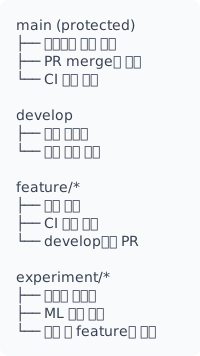
5.1 브랜치 전략
5.2 체크리스트
CI 체크리스트:
[ ] 코드 린트 통과
[ ] 단위 테스트 통과 (커버리지 > 80%)
[ ] 데이터 검증 통과
[ ] 모델 학습 성공 (샘플 데이터)
[ ] 모델 평가 기준 통과

CD 체크리스트:
[ ] 전체 데이터 학습 완료
[ ] 모델 레지스트리 등록
[ ] Staging 배포 성공
[ ] 통합 테스트 통과
[ ] 성능 테스트 통과 (P95 < 500ms)
[ ] Canary 검증 통과 (Error < 1%)
[ ] Production 배포 승인
6. 트러블슈팅 가이드
6.1 일반적인 CI/CD 실패 케이스
| 실패 유형 | 원인 | 해결책 |
|---|---|---|
| 데이터 pull 실패 | DVC 인증 만료 | Secrets 갱신, 토큰 rotation |
| 학습 시간 초과 | 데이터 크기 증가 | 샘플링, 병렬화, 타임아웃 증가 |
| 메모리 부족 | 모델/데이터 크기 | Runner 스펙 업그레이드, 배치 처리 |
| 테스트 불안정 | 랜덤 시드 미고정 | PYTHONHASHSEED, numpy seed 고정 |
| 배포 실패 | 이미지 pull 오류 | Registry 인증 확인, 태그 검증 |
6.2 데이터 관련 실패
# 데이터 검증 실패 처리
- name: Validate and pull data
  id: data_validation
  continue-on-error: true
  run: |
    dvc pull data/train/ || {
      echo "DVC pull failed, attempting fallback"
      # 캐시된 데이터 사용
      if [ -d ".dvc/cache" ]; then
        dvc checkout
      else
        echo "No cached data available"
        exit 1
      fi
    }

    # 데이터 무결성 검증
    python scripts/validate_data.py || {
      echo "Data validation failed"
      python scripts/generate_data_report.py > data_report.md
      exit 1
    }

- name: Handle data validation failure
  if: steps.data_validation.outcome == 'failure'
  run: |
    # Slack 알림
    curl -X POST $SLACK_WEBHOOK -d '{
      "text": "Data validation failed in CI pipeline",
      "attachments": [{"text": "Check data report for details"}]
    }'
6.3 모델 학습 실패 디버깅
# scripts/debug_training.py
import sys
import traceback
import json
from datetime import datetime

def training_with_diagnostics():
    """학습 실패 시 진단 정보 수집"""
    diagnostics = {
        "timestamp": datetime.now().isoformat(),
        "python_version": sys.version,
        "environment": {},
        "data_stats": {},
        "error": None,
    }

    try:
        # 환경 정보 수집
        import torch
        import numpy as np
        diagnostics["environment"] = {
            "torch_version": torch.__version__,
            "cuda_available": torch.cuda.is_available(),
            "cuda_version": torch.version.cuda if torch.cuda.is_available() else None,
            "gpu_count": torch.cuda.device_count() if torch.cuda.is_available() else 0,
        }

        # 데이터 통계
        import pandas as pd
        df = pd.read_parquet("data/train.parquet")
        diagnostics["data_stats"] = {
            "rows": len(df),
            "columns": list(df.columns),
            "null_counts": df.isnull().sum().to_dict(),
            "dtypes": {str(k): str(v) for k, v in df.dtypes.items()},
        }

        # 실제 학습
        from src.train import train_model
        train_model()

    except Exception as e:
        diagnostics["error"] = {
            "type": type(e).__name__,
            "message": str(e),
            "traceback": traceback.format_exc(),
        }

        # 진단 정보 저장
        with open("training_diagnostics.json", "w") as f:
            json.dump(diagnostics, f, indent=2)

        raise

    return diagnostics

if __name__ == "__main__":
    training_with_diagnostics()
# CI에서 진단 정보 활용
- name: Train with diagnostics
  id: training
  continue-on-error: true
  run: python scripts/debug_training.py

- name: Upload diagnostics on failure
  if: steps.training.outcome == 'failure'
  uses: actions/upload-artifact@v3
  with:
    name: training-diagnostics
    path: training_diagnostics.json

- name: Comment PR with failure details
  if: steps.training.outcome == 'failure' && github.event_name == 'pull_request'
  uses: actions/github-script@v6
  with:
    script: |
      const fs = require('fs');
      const diagnostics = JSON.parse(fs.readFileSync('training_diagnostics.json'));

      github.rest.issues.createComment({
        owner: context.repo.owner,
        repo: context.repo.repo,
        issue_number: context.issue.number,
        body: `## Training Failed

        **Error:** ${diagnostics.error.type}: ${diagnostics.error.message}

        **Data Stats:**
        - Rows: ${diagnostics.data_stats.rows}
        - Columns: ${diagnostics.data_stats.columns.length}

        <details>
        <summary>Full Traceback</summary>

        \`\`\`
        ${diagnostics.error.traceback}
        \`\`\`
        </details>`
      });
6.4 배포 롤백 자동화
# .github/workflows/auto-rollback.yml
name: Auto Rollback on Failure

on:
  workflow_run:
    workflows: ["ML CD Pipeline"]
    types: [completed]

jobs:
  check-and-rollback:
    if: ${{ github.event.workflow_run.conclusion == 'success' }}
    runs-on: ubuntu-latest
    steps:
      - uses: actions/checkout@v4

      - name: Wait for deployment stabilization
        run: sleep 300  # 5분 대기

      - name: Check production health
        id: health_check
        run: |
          # 에러율 체크
          ERROR_RATE=$(curl -s "http://prometheus:9090/api/v1/query?query=rate(model_errors_total[5m])" | jq '.data.result[0].value[1]')

          # P95 지연시간 체크
          LATENCY=$(curl -s "http://prometheus:9090/api/v1/query?query=histogram_quantile(0.95,rate(model_latency_bucket[5m]))" | jq '.data.result[0].value[1]')

          echo "error_rate=$ERROR_RATE" >> $GITHUB_OUTPUT
          echo "latency=$LATENCY" >> $GITHUB_OUTPUT

          # 임계값 검사
          if (( $(echo "$ERROR_RATE > 0.05" | bc -l) )); then
            echo "needs_rollback=true" >> $GITHUB_OUTPUT
          elif (( $(echo "$LATENCY > 2.0" | bc -l) )); then
            echo "needs_rollback=true" >> $GITHUB_OUTPUT
          else
            echo "needs_rollback=false" >> $GITHUB_OUTPUT
          fi

      - name: Rollback deployment
        if: steps.health_check.outputs.needs_rollback == 'true'
        env:
          KUBECONFIG: ${{ secrets.KUBECONFIG }}
        run: |
          # 이전 버전으로 롤백
          kubectl rollout undo deployment/ml-model -n production

          # 롤백 완료 대기
          kubectl rollout status deployment/ml-model -n production

      - name: Notify rollback
        if: steps.health_check.outputs.needs_rollback == 'true'
        run: |
          curl -X POST ${{ secrets.SLACK_WEBHOOK }} -d '{
            "text": ":warning: Production rollback executed",
            "attachments": [{
              "color": "danger",
              "fields": [
                {"title": "Error Rate", "value": "${{ steps.health_check.outputs.error_rate }}", "short": true},
                {"title": "P95 Latency", "value": "${{ steps.health_check.outputs.latency }}s", "short": true}
              ]
            }]
          }'
6.5 Flaky 테스트 처리
# 불안정한 테스트 재시도 전략
- name: Run tests with retry
  uses: nick-invision/retry@v2
  with:
    timeout_minutes: 30
    max_attempts: 3
    retry_on: error
    command: |
      # 랜덤 시드 고정
      export PYTHONHASHSEED=42

      # 테스트 실행
      pytest tests/ -v \
        --randomly-seed=42 \
        --tb=short \
        -x  # 첫 실패에서 중단

# 또는 pytest-retry 사용
- name: Run tests with pytest-retry
  run: |
    pip install pytest-retry
    pytest tests/ -v --retries 2 --retry-delay 5
6.6 리소스 관리
# GPU 리소스 효율적 사용
jobs:
  train:
    runs-on: [self-hosted, gpu]
    timeout-minutes: 360  # 6시간 제한

    steps:
      - name: Check GPU availability
        run: |
          nvidia-smi
          # GPU 메모리 정리
          python -c "import torch; torch.cuda.empty_cache()"

      - name: Train with memory management
        run: |
          # 메모리 효율적 학습
          python src/train.py \
            --gradient-checkpointing \
            --fp16 \
            --batch-size 16 \
            --gradient-accumulation-steps 4
        env:
          PYTORCH_CUDA_ALLOC_CONF: max_split_size_mb:512

      - name: Cleanup GPU memory
        if: always()
        run: |
          python -c "import torch; torch.cuda.empty_cache()"
          nvidia-smi
7. 실무 모범 사례
7.1 CI/CD 파이프라인 최적화
# 캐싱 전략
- name: Cache dependencies
  uses: actions/cache@v3
  with:
    path: |
      ~/.cache/pip
      ~/.cache/huggingface
      .dvc/cache
    key: ${{ runner.os }}-pip-${{ hashFiles('**/requirements.txt') }}
    restore-keys: |
      ${{ runner.os }}-pip-

# 병렬 실행
jobs:
  lint:
    runs-on: ubuntu-latest
    # 빠른 작업

  test:
    runs-on: ubuntu-latest
    needs: lint
    strategy:
      matrix:
        test-group: [unit, integration, model]
    # 테스트 병렬화

  train:
    runs-on: [self-hosted, gpu]
    needs: test
    # lint, test 통과 후에만 GPU 사용
7.2 PR 체크리스트 자동화
# .github/workflows/pr-checks.yml
name: PR Quality Checks

on:
  pull_request:
    types: [opened, synchronize]

jobs:
  checklist:
    runs-on: ubuntu-latest
    steps:
      - uses: actions/checkout@v4
        with:
          fetch-depth: 0

      - name: Check model changes
        id: model_changes
        run: |
          if git diff --name-only origin/main...HEAD | grep -E "^(src/model|models/)" > /dev/null; then
            echo "model_changed=true" >> $GITHUB_OUTPUT
          fi

      - name: Check data changes
        id: data_changes
        run: |
          if git diff --name-only origin/main...HEAD | grep -E "\.dvc$" > /dev/null; then
            echo "data_changed=true" >> $GITHUB_OUTPUT
          fi

      - name: Comment checklist
        uses: actions/github-script@v6
        with:
          script: |
            const modelChanged = '${{ steps.model_changes.outputs.model_changed }}' === 'true';
            const dataChanged = '${{ steps.data_changes.outputs.data_changed }}' === 'true';

            let checklist = '## PR Checklist\n\n';

            if (modelChanged) {
              checklist += '### Model Changes Detected\n';
              checklist += '- [ ] Model performance validated\n';
              checklist += '- [ ] Backward compatibility checked\n';
              checklist += '- [ ] Model size acceptable\n';
            }

            if (dataChanged) {
              checklist += '### Data Changes Detected\n';
              checklist += '- [ ] Data quality validated\n';
              checklist += '- [ ] DVC push completed\n';
              checklist += '- [ ] Data documentation updated\n';
            }

            checklist += '\n### General\n';
            checklist += '- [ ] Tests pass locally\n';
            checklist += '- [ ] Code review completed\n';

            github.rest.issues.createComment({
              owner: context.repo.owner,
              repo: context.repo.repo,
              issue_number: context.issue.number,
              body: checklist
            });
7.3 환경별 설정 관리
# configs/environments/
# production.yaml
model:
  batch_size: 64
  precision: fp16

deployment:
  replicas: 4
  resources:
    gpu: 2
    memory: 32Gi

monitoring:
  alert_threshold_latency: 500ms
  alert_threshold_error_rate: 0.01

# staging.yaml
model:
  batch_size: 32
  precision: fp32

deployment:
  replicas: 1
  resources:
    gpu: 1
    memory: 16Gi
# CI에서 환경 설정 로드
- name: Load environment config
  run: |
    ENV=${{ github.ref == 'refs/heads/main' && 'production' || 'staging' }}
    cp configs/environments/${ENV}.yaml config.yaml

    # 환경 변수로 내보내기
    yq eval -o=shell config.yaml > env_vars.sh
    source env_vars.sh