모델 버저닝 (MLflow, DVC)
ML 프로젝트에서 코드, 데이터, 모델, 환경을 체계적으로 관리하기 위한 버저닝 전략과 도구.
1. 버저닝이 필요한 이유
| 구성 요소 | 문제 | 해결책 |
|---|---|---|
| 코드 | "어떤 코드로 학습했지?" | Git |
| 데이터 | "학습에 사용한 데이터는?" | DVC |
| 모델 | "가장 좋은 모델은?" | MLflow Model Registry |
| 환경 | "어떤 라이브러리 버전?" | Docker, Conda |
| 하이퍼파라미터 | "어떤 설정이었지?" | MLflow Tracking |
2. MLflow
2.1 구성 요소
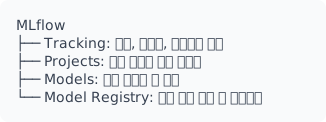
2.2 MLflow Tracking
import mlflow
import mlflow.sklearn
from sklearn.ensemble import RandomForestClassifier
from sklearn.model_selection import train_test_split
from sklearn.metrics import accuracy_score, f1_score
import pandas as pd

# 트래킹 서버 설정 (선택)
mlflow.set_tracking_uri("http://mlflow-server:5000")

# 실험 생성/선택
mlflow.set_experiment("house-price-prediction")

# 데이터 로드
df = pd.read_csv("data/train.csv")
X = df.drop("target", axis=1)
y = df["target"]
X_train, X_test, y_train, y_test = train_test_split(X, y, test_size=0.2)

# 하이퍼파라미터
params = {
    "n_estimators": 100,
    "max_depth": 10,
    "min_samples_split": 5,
    "random_state": 42,
}

with mlflow.start_run(run_name="rf_baseline"):
    # 1. 파라미터 로깅
    mlflow.log_params(params)

    # 2. 태그 설정
    mlflow.set_tags({
        "model_type": "RandomForest",
        "data_version": "v1.2",
        "engineer": "team_a",
    })

    # 3. 모델 학습
    model = RandomForestClassifier(**params)
    model.fit(X_train, y_train)

    # 4. 메트릭 로깅
    y_pred = model.predict(X_test)
    accuracy = accuracy_score(y_test, y_pred)
    f1 = f1_score(y_test, y_pred, average="weighted")

    mlflow.log_metric("accuracy", accuracy)
    mlflow.log_metric("f1_score", f1)

    # 5. 아티팩트 로깅 (파일)
    mlflow.log_artifact("data/feature_importance.csv")
    mlflow.log_artifact("plots/confusion_matrix.png")

    # 6. 모델 저장
    mlflow.sklearn.log_model(
        model,
        "model",
        signature=mlflow.models.infer_signature(X_train, y_pred),
        input_example=X_train.iloc[:5],
    )

    print(f"Run ID: {mlflow.active_run().info.run_id}")
2.3 자동 로깅
# scikit-learn
mlflow.sklearn.autolog()

# PyTorch
mlflow.pytorch.autolog()

# TensorFlow/Keras
mlflow.tensorflow.autolog()

# XGBoost
mlflow.xgboost.autolog()

# LightGBM
mlflow.lightgbm.autolog()

# 사용 예시
mlflow.sklearn.autolog(
    log_input_examples=True,
    log_model_signatures=True,
    log_models=True,
    disable=False,
    exclusive=False,
    disable_for_unsupported_versions=False,
    silent=False,
)

with mlflow.start_run():
    model = RandomForestClassifier(n_estimators=100)
    model.fit(X_train, y_train)
    # 자동으로 파라미터, 메트릭, 모델 로깅
2.4 Model Registry
import mlflow
from mlflow.tracking import MlflowClient

client = MlflowClient()

# 1. 모델 등록
model_uri = "runs:/abc123/model"
model_details = mlflow.register_model(model_uri, "HousePricePredictor")

# 2. 모델 버전 조회
model_name = "HousePricePredictor"
versions = client.search_model_versions(f"name='{model_name}'")
for v in versions:
    print(f"Version: {v.version}, Stage: {v.current_stage}, Run ID: {v.run_id}")

# 3. 스테이지 전환
client.transition_model_version_stage(
    name="HousePricePredictor",
    version=3,
    stage="Production",  # None, Staging, Production, Archived
    archive_existing_versions=True,  # 기존 Production 모델 Archived로
)

# 4. 모델 로드 (스테이지 기반)
model = mlflow.pyfunc.load_model(
    model_uri="models:/HousePricePredictor/Production"
)

# 또는 버전 기반
model = mlflow.pyfunc.load_model(
    model_uri="models:/HousePricePredictor/3"
)

# 5. 예측
predictions = model.predict(X_test)
2.5 Model Registry 워크플로우
                    +-------------+
                    |   개발 환경   |
                    +-------------+
                          |
                    [모델 학습]
                          |
                          v
+-------+      +------------------+      +-----------+
| None  | ---> |     Staging      | ---> | Production |
+-------+      +------------------+      +-----------+
    ^                   |                      |
    |              [테스트]                 [서빙]
    |                   |                      |
    |                   v                      v
    |          +------------------+      +-----------+
    +--------- |    Archived      | <--- | (교체시)   |
               +------------------+      +-----------+
2.6 프로젝트 구성 (MLproject)
# MLproject
name: house_price_prediction

conda_env: conda.yaml
# 또는
# docker_env:
#   image: my-ml-image:latest

entry_points:
  main:
    parameters:
      data_path: {type: str, default: "data/train.csv"}
      n_estimators: {type: int, default: 100}
      max_depth: {type: int, default: 10}
    command: "python train.py --data-path {data_path} --n-estimators {n_estimators} --max-depth {max_depth}"

  validate:
    parameters:
      model_uri: {type: str}
      test_data: {type: str}
    command: "python validate.py --model-uri {model_uri} --test-data {test_data}"
# 로컬 실행
mlflow run . -P n_estimators=200 -P max_depth=15

# Git 리포지토리에서 실행
mlflow run https://github.com/user/ml-project -P data_path=s3://bucket/data.csv

# 특정 버전/브랜치
mlflow run https://github.com/user/ml-project --version main
3. DVC (Data Version Control)
3.1 기본 개념
3.2 초기 설정
# 프로젝트 초기화
cd ml-project
git init
dvc init

# 원격 저장소 설정
dvc remote add -d myremote s3://my-bucket/dvc-store
dvc remote modify myremote region ap-northeast-2

# 또는 로컬 저장소
dvc remote add -d localremote /mnt/data/dvc-store
3.3 데이터 버저닝
# 데이터 추적
dvc add data/train.csv
dvc add data/images/

# 생성된 파일
# data/train.csv.dvc  <- Git에 커밋
# data/images.dvc     <- Git에 커밋
# .gitignore          <- 자동 업데이트

# Git 커밋
git add data/train.csv.dvc data/images.dvc .gitignore
git commit -m "Add training data v1"

# DVC 원격 저장소에 푸시
dvc push

# 데이터 다운로드 (다른 환경에서)
git clone https://github.com/user/ml-project
cd ml-project
dvc pull
3.4 .dvc 파일 구조
# data/train.csv.dvc
outs:
- md5: a8f5f167f44f4964e6c998dee827110c
  size: 1048576
  path: train.csv
  hash: md5

# 또는 디렉토리
# data/images.dvc
outs:
- md5: d8e8fca2dc0f896fd7cb4cb0031ba249.dir
  size: 104857600
  nfiles: 1000
  path: images
3.5 DVC 파이프라인
# dvc.yaml
stages:
  prepare:
    cmd: python src/prepare.py
    deps:
      - src/prepare.py
      - data/raw/
    params:
      - prepare.split_ratio
    outs:
      - data/processed/train.csv
      - data/processed/test.csv

  train:
    cmd: python src/train.py
    deps:
      - src/train.py
      - data/processed/train.csv
    params:
      - train.n_estimators
      - train.max_depth
    outs:
      - models/model.pkl
    metrics:
      - metrics/train_metrics.json:
          cache: false

  evaluate:
    cmd: python src/evaluate.py
    deps:
      - src/evaluate.py
      - models/model.pkl
      - data/processed/test.csv
    metrics:
      - metrics/eval_metrics.json:
          cache: false
    plots:
      - metrics/confusion_matrix.csv:
          x: predicted
          y: actual
3.6 실험 관리 (DVC Experiments)
# 실험 실행
dvc exp run

# 파라미터 변경하여 실험
dvc exp run -S train.n_estimators=200
dvc exp run -S train.n_estimators=300 -S train.max_depth=15

# 여러 실험 병렬 실행
dvc exp run --queue -S train.n_estimators=100
dvc exp run --queue -S train.n_estimators=200
dvc exp run --queue -S train.n_estimators=300
dvc queue start --jobs 3

# 실험 목록
dvc exp show

# 실험 비교
dvc exp diff exp-abc123 exp-def456

# 실험을 브랜치로 저장
dvc exp branch exp-abc123 feature/best-model

# 실험 적용 (워크스페이스에)
dvc exp apply exp-abc123
3.7 데이터 버전 전환
# 특정 버전의 데이터 체크아웃
git checkout v1.0  # Git 태그
dvc checkout

# 또는 특정 커밋
git checkout abc123
dvc checkout

# 이전 버전과 현재 비교
dvc diff HEAD~1

# 데이터 목록 및 크기
dvc list . --dvc-only
4. MLflow + DVC 통합
4.1 통합 워크플로우
import mlflow
import subprocess
import yaml

# DVC로 데이터 준비
subprocess.run(["dvc", "pull"], check=True)

# 파라미터 로드
with open("params.yaml") as f:
    params = yaml.safe_load(f)

# MLflow 실험 시작
with mlflow.start_run():
    # DVC 데이터 버전 로깅
    dvc_lock = yaml.safe_load(open("dvc.lock"))
    data_version = dvc_lock["stages"]["prepare"]["outs"][0]["md5"]
    mlflow.set_tag("data_version", data_version)

    # Git 커밋 해시 로깅
    git_hash = subprocess.check_output(
        ["git", "rev-parse", "HEAD"]
    ).decode().strip()
    mlflow.set_tag("git_commit", git_hash)

    # 파라미터 로깅
    mlflow.log_params(params["train"])

    # 학습
    # ...
4.2 CI/CD 파이프라인 예시
# .github/workflows/ml-pipeline.yml
name: ML Pipeline

on:
  push:
    branches: [main]
  pull_request:
    branches: [main]

jobs:
  train:
    runs-on: ubuntu-latest

    steps:
    - uses: actions/checkout@v3

    - name: Setup Python
      uses: actions/setup-python@v4
      with:
        python-version: '3.10'

    - name: Install dependencies
      run: |
        pip install -r requirements.txt
        pip install dvc[s3] mlflow

    - name: Configure DVC
      env:
        AWS_ACCESS_KEY_ID: ${{ secrets.AWS_ACCESS_KEY_ID }}
        AWS_SECRET_ACCESS_KEY: ${{ secrets.AWS_SECRET_ACCESS_KEY }}
      run: |
        dvc remote modify myremote access_key_id $AWS_ACCESS_KEY_ID
        dvc remote modify myremote secret_access_key $AWS_SECRET_ACCESS_KEY

    - name: Pull data
      run: dvc pull

    - name: Run pipeline
      env:
        MLFLOW_TRACKING_URI: ${{ secrets.MLFLOW_TRACKING_URI }}
      run: dvc repro

    - name: Push artifacts
      if: github.ref == 'refs/heads/main'
      run: dvc push
5. 모범 사례
5.1 버저닝 전략
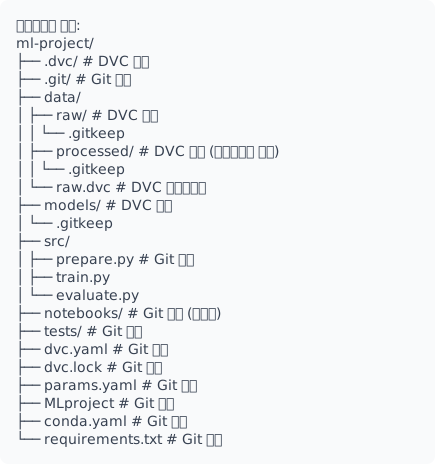
5.2 태깅 전략
# 데이터 버전 태그
git tag -a data-v1.0 -m "Initial dataset"
dvc push

# 모델 버전 태그
git tag -a model-v1.0 -m "Baseline model, accuracy=0.85"
dvc push

# 릴리스 태그
git tag -a release-v1.0 -m "Production release"
5.3 실험 추적 체크리스트
필수 로깅 항목:
[ ] Git commit hash
[ ] Data version (DVC hash)
[ ] 하이퍼파라미터
[ ] 학습/검증 메트릭
[ ] 모델 아티팩트
[ ] 환경 정보 (conda.yaml / requirements.txt)

권장 로깅 항목:
[ ] 학습 시간
[ ] 데이터 통계 (행 수, 결측치)
[ ] 특성 중요도
[ ] 혼동 행렬
[ ] 학습 곡선
6. Weights & Biases (W&B)
W&B는 실험 추적, 데이터셋 버저닝, 모델 레지스트리, 협업 기능을 제공하는 MLOps 플랫폼.
6.1 설치 및 초기화
6.2 기본 실험 추적
import wandb
from sklearn.ensemble import RandomForestClassifier
from sklearn.model_selection import train_test_split
from sklearn.metrics import accuracy_score, f1_score
import pandas as pd

# W&B 초기화
wandb.init(
    project="house-price-prediction",
    name="rf_baseline",
    config={
        "n_estimators": 100,
        "max_depth": 10,
        "min_samples_split": 5,
        "random_state": 42,
    },
    tags=["baseline", "random_forest"],
)

# 설정 접근
config = wandb.config

# 데이터 로드
df = pd.read_csv("data/train.csv")
X = df.drop("target", axis=1)
y = df["target"]
X_train, X_test, y_train, y_test = train_test_split(X, y, test_size=0.2)

# 모델 학습
model = RandomForestClassifier(
    n_estimators=config.n_estimators,
    max_depth=config.max_depth,
    min_samples_split=config.min_samples_split,
    random_state=config.random_state,
)
model.fit(X_train, y_train)

# 메트릭 로깅
y_pred = model.predict(X_test)
accuracy = accuracy_score(y_test, y_pred)
f1 = f1_score(y_test, y_pred, average="weighted")

wandb.log({
    "accuracy": accuracy,
    "f1_score": f1,
    "train_samples": len(X_train),
    "test_samples": len(X_test),
})

# 아티팩트 저장
artifact = wandb.Artifact("model", type="model")
artifact.add_file("model.pkl")
wandb.log_artifact(artifact)

# 실험 종료
wandb.finish()
6.3 학습 곡선 로깅
import wandb

wandb.init(project="deep-learning", name="cnn_training")

for epoch in range(100):
    train_loss, train_acc = train_one_epoch(model, train_loader)
    val_loss, val_acc = evaluate(model, val_loader)

    # 에포크별 메트릭 로깅
    wandb.log({
        "epoch": epoch,
        "train/loss": train_loss,
        "train/accuracy": train_acc,
        "val/loss": val_loss,
        "val/accuracy": val_acc,
        "learning_rate": scheduler.get_last_lr()[0],
    })

    # 조기 종료 체크
    if val_loss < best_val_loss:
        best_val_loss = val_loss
        wandb.run.summary["best_val_loss"] = best_val_loss
        wandb.run.summary["best_epoch"] = epoch

wandb.finish()
6.4 시각화
import wandb
import matplotlib.pyplot as plt
import numpy as np
from sklearn.metrics import confusion_matrix, ConfusionMatrixDisplay

wandb.init(project="visualization-demo")

# 혼동 행렬
cm = confusion_matrix(y_test, y_pred)
fig, ax = plt.subplots(figsize=(8, 6))
ConfusionMatrixDisplay(cm, display_labels=class_names).plot(ax=ax)
wandb.log({"confusion_matrix": wandb.Image(fig)})
plt.close()

# 테이블 로깅
table = wandb.Table(columns=["id", "prediction", "actual", "confidence"])
for i, (pred, actual, conf) in enumerate(zip(y_pred, y_test, confidences)):
    table.add_data(i, pred, actual, conf)
wandb.log({"predictions": table})

# 히스토그램
wandb.log({"prediction_distribution": wandb.Histogram(y_pred)})

# 이미지 로깅
images = [wandb.Image(img, caption=f"Label: {label}")
          for img, label in zip(sample_images, sample_labels)]
wandb.log({"sample_images": images})

wandb.finish()
6.5 하이퍼파라미터 Sweep
import wandb

# Sweep 설정
sweep_config = {
    "method": "bayes",  # random, grid, bayes
    "metric": {"name": "val_accuracy", "goal": "maximize"},
    "parameters": {
        "learning_rate": {
            "distribution": "log_uniform_values",
            "min": 1e-5,
            "max": 1e-2,
        },
        "batch_size": {"values": [16, 32, 64, 128]},
        "epochs": {"value": 50},
        "optimizer": {"values": ["adam", "sgd", "adamw"]},
        "dropout": {"distribution": "uniform", "min": 0.1, "max": 0.5},
    },
    "early_terminate": {
        "type": "hyperband",
        "min_iter": 5,
    },
}

# Sweep 생성
sweep_id = wandb.sweep(sweep_config, project="hyperparameter-tuning")

def train():
    wandb.init()
    config = wandb.config

    model = create_model(
        learning_rate=config.learning_rate,
        dropout=config.dropout,
    )

    for epoch in range(config.epochs):
        train_loss = train_epoch(model, train_loader, config.batch_size)
        val_acc = evaluate(model, val_loader)
        wandb.log({"train_loss": train_loss, "val_accuracy": val_acc})

# Sweep 실행
wandb.agent(sweep_id, function=train, count=50)
6.6 모델 레지스트리
import wandb

# 모델 등록
run = wandb.init(project="production-models")

# 학습 및 평가...
accuracy = 0.95

# 아티팩트로 모델 저장
artifact = wandb.Artifact(
    name="text-classifier",
    type="model",
    description="BERT-based text classifier",
    metadata={
        "accuracy": accuracy,
        "framework": "pytorch",
        "dataset_version": "v2.0",
    },
)
artifact.add_file("model.pt")
artifact.add_file("config.json")

# 레지스트리에 등록
run.log_artifact(artifact)

# 프로덕션 태그 추가
if accuracy > 0.9:
    artifact.aliases.append("production")
    artifact.save()

wandb.finish()

# 모델 로드
run = wandb.init(project="production-models")
artifact = run.use_artifact("text-classifier:production")
artifact_dir = artifact.download()
model = load_model(f"{artifact_dir}/model.pt")
6.7 데이터셋 버저닝
import wandb

# 데이터셋 아티팩트 생성
run = wandb.init(project="dataset-management")

artifact = wandb.Artifact(
    name="training-data",
    type="dataset",
    description="Training dataset v2",
    metadata={
        "num_samples": 50000,
        "num_features": 128,
        "collection_date": "2024-01-15",
    },
)

# 디렉토리 추가
artifact.add_dir("data/processed/")

# 참조만 추가 (대용량 데이터)
artifact.add_reference("s3://bucket/large-dataset/", name="raw_data")

run.log_artifact(artifact)
wandb.finish()

# 데이터셋 사용
run = wandb.init(project="training")
artifact = run.use_artifact("training-data:latest")
data_dir = artifact.download()
6.8 팀 협업
import wandb

# 팀 프로젝트
wandb.init(
    entity="ml-team",  # 팀/조직 이름
    project="shared-project",
    name="experiment-1",
    notes="Testing new architecture",
    tags=["experiment", "team-review"],
)

# 알림 설정
wandb.alert(
    title="Training Complete",
    text=f"Model achieved {accuracy:.2%} accuracy",
    level=wandb.AlertLevel.INFO,
)

# 리포트 생성 (웹 UI에서)
# - 실험 비교
# - 차트 구성
# - 팀원과 공유
6.9 W&B vs MLflow 비교
| 기능 | W&B | MLflow |
|---|---|---|
| 호스팅 | SaaS (Self-host 가능) | Self-host |
| UI/UX | 직관적, 현대적 | 기본적 |
| 협업 | 팀 기능 내장 | 제한적 |
| Sweep | 내장 (Bayesian) | 외부 도구 필요 |
| 가격 | 무료 tier + 유료 | 오픈소스 |
| 시각화 | 풍부한 차트 | 기본 |
| 모델 레지스트리 | O | O |
선택 기준: - 팀 협업, 풍부한 시각화: W&B - 완전한 제어, 비용 절감: MLflow - 둘 다 사용 가능: W&B 실험 추적 + MLflow 모델 레지스트리
7. 트러블슈팅
7.1 일반적인 문제
| 문제 | 증상 | 해결책 |
|---|---|---|
| 재현 불가 | 같은 코드, 다른 결과 | 랜덤 시드 고정, 환경 버저닝 |
| 느린 데이터 로드 | DVC pull 시간 초과 | 캐시 활용, 부분 pull |
| MLflow 서버 연결 실패 | 네트워크 오류 | MLFLOW_TRACKING_URI 확인 |
| 대용량 아티팩트 | 업로드 실패 | 청크 업로드, 참조 사용 |
| 실험 충돌 | 동시 실행 충돌 | run_name 고유화 |
7.2 DVC 트러블슈팅
# 캐시 정리
dvc gc -w

# 원격 연결 테스트
dvc remote modify myremote --list
dvc remote default

# 강제 pull
dvc pull -f

# 잠금 파일 제거
rm .dvc/lock
dvc checkout
7.3 MLflow 트러블슈팅
# 디버그 로깅 활성화
import logging
logging.getLogger("mlflow").setLevel(logging.DEBUG)

# 연결 테스트
import mlflow
client = mlflow.tracking.MlflowClient()
print(client.list_experiments())

# 실험 ID 확인
experiment = mlflow.get_experiment_by_name("my-experiment")
print(f"Experiment ID: {experiment.experiment_id}")