이미지 인코딩 (Image Encoding)
이미지를 VLM이 처리할 수 있는 벡터 시퀀스로 변환하는 과정. Vision Encoder는 VLM의 "눈" 역할을 함.
왜 이미지 인코딩이 필요한가
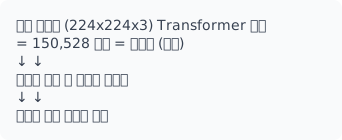
문제: 픽셀은 의미 없는 숫자. LLM은 토큰(의미 단위)을 처리.
해결: 이미지 → 의미 있는 토큰 시퀀스로 변환
Vision Transformer (ViT)
핵심 아이디어
CNN 대신 Transformer로 이미지 처리. 이미지를 패치로 분할하여 시퀀스처럼 처리.
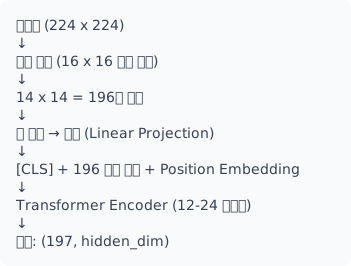
패치 크기와 토큰 수
| 이미지 크기 | 패치 크기 | 토큰 수 | 계산 비용 |
|---|---|---|---|
| 224x224 | 16x16 | 196 | 기본 |
| 224x224 | 14x14 | 256 | 중간 |
| 336x336 | 14x14 | 576 | 높음 |
| 448x448 | 14x14 | 1024 | 매우 높음 |
Trade-off: 작은 패치 = 더 세밀한 정보, 더 많은 계산
구현
import torch
import torch.nn as nn
import torch.nn.functional as F

class PatchEmbedding(nn.Module):
    """이미지를 패치로 분할하고 임베딩"""

    def __init__(self, img_size=224, patch_size=16, in_channels=3, embed_dim=768):
        super().__init__()
        self.img_size = img_size
        self.patch_size = patch_size
        self.num_patches = (img_size // patch_size) ** 2

        # 패치 → 임베딩 (Conv2d로 효율적 구현)
        # kernel_size=stride=patch_size로 비중첩 패치 추출
        self.projection = nn.Conv2d(
            in_channels, embed_dim,
            kernel_size=patch_size, stride=patch_size
        )

    def forward(self, x):
        # x: (batch, 3, 224, 224)
        x = self.projection(x)  # (batch, embed_dim, 14, 14)
        x = x.flatten(2)        # (batch, embed_dim, 196)
        x = x.transpose(1, 2)   # (batch, 196, embed_dim)
        return x


class ViT(nn.Module):
    """Vision Transformer"""

    def __init__(
        self,
        img_size=224,
        patch_size=16,
        in_channels=3,
        embed_dim=768,
        num_heads=12,
        num_layers=12,
        mlp_ratio=4.0,
        num_classes=1000
    ):
        super().__init__()

        self.patch_embed = PatchEmbedding(
            img_size, patch_size, in_channels, embed_dim
        )
        num_patches = self.patch_embed.num_patches

        # [CLS] 토큰: 이미지 전체 표현
        self.cls_token = nn.Parameter(torch.zeros(1, 1, embed_dim))

        # Position embedding: 각 패치의 위치 정보
        self.pos_embed = nn.Parameter(
            torch.zeros(1, num_patches + 1, embed_dim)
        )

        # Transformer Encoder
        encoder_layer = nn.TransformerEncoderLayer(
            d_model=embed_dim,
            nhead=num_heads,
            dim_feedforward=int(embed_dim * mlp_ratio),
            dropout=0.1,
            activation='gelu',
            batch_first=True,
            norm_first=True  # Pre-LN (더 안정적)
        )
        self.encoder = nn.TransformerEncoder(encoder_layer, num_layers=num_layers)

        # 최종 정규화 및 분류 헤드
        self.norm = nn.LayerNorm(embed_dim)
        self.head = nn.Linear(embed_dim, num_classes)

        # 가중치 초기화
        self._init_weights()

    def _init_weights(self):
        # Position embedding: truncated normal
        nn.init.trunc_normal_(self.pos_embed, std=0.02)
        nn.init.trunc_normal_(self.cls_token, std=0.02)

    def forward(self, x, return_features=False):
        batch_size = x.shape[0]

        # 패치 임베딩
        x = self.patch_embed(x)  # (batch, num_patches, embed_dim)

        # [CLS] 토큰 추가
        cls_tokens = self.cls_token.expand(batch_size, -1, -1)
        x = torch.cat([cls_tokens, x], dim=1)  # (batch, 1+num_patches, embed_dim)

        # Position embedding 추가
        x = x + self.pos_embed

        # Transformer Encoder
        x = self.encoder(x)
        x = self.norm(x)

        if return_features:
            return x  # 모든 토큰 반환

        # 분류: [CLS] 토큰 사용
        return self.head(x[:, 0])
Position Embedding의 중요성
# Position Embedding 없으면:
# 이미지를 섞어도 같은 결과 → 위치 정보 손실

# 종류:
# 1. Learned (가장 일반적)
self.pos_embed = nn.Parameter(torch.zeros(1, num_patches + 1, embed_dim))

# 2. Sinusoidal (NLP에서 유래)
def get_sinusoidal_pos(num_patches, embed_dim):
    position = torch.arange(num_patches).unsqueeze(1)
    div_term = torch.exp(torch.arange(0, embed_dim, 2) * (-np.log(10000.0) / embed_dim))
    pe = torch.zeros(num_patches, embed_dim)
    pe[:, 0::2] = torch.sin(position * div_term)
    pe[:, 1::2] = torch.cos(position * div_term)
    return pe

# 3. 2D Position (공간 정보 명시)
def get_2d_pos(h, w, embed_dim):
    pos_h = get_sinusoidal_pos(h, embed_dim // 2)
    pos_w = get_sinusoidal_pos(w, embed_dim // 2)
    # 조합...
CLIP Vision Encoder
대조 학습으로 훈련된 Vision Encoder. VLM의 표준.
왜 CLIP이 VLM에 적합한가
| 특성 | 일반 ViT | CLIP ViT |
|---|---|---|
| 학습 목표 | ImageNet 분류 | 이미지-텍스트 정렬 |
| 표현 공간 | 클래스 분류용 | 언어와 공유 |
| 제로샷 | 불가 | 가능 |
| VLM 적합성 | 추가 정렬 필요 | 바로 사용 가능 |
사용 예시
from transformers import CLIPVisionModel, CLIPProcessor
import torch

# CLIP Vision Encoder 로드
vision_model = CLIPVisionModel.from_pretrained("openai/clip-vit-large-patch14")
processor = CLIPProcessor.from_pretrained("openai/clip-vit-large-patch14")

# 이미지 전처리 및 인코딩
image = Image.open("image.jpg")
inputs = processor(images=image, return_tensors="pt")
outputs = vision_model(**inputs)

# 출력 구조
print(outputs.last_hidden_state.shape)  # (1, 257, 1024) - 모든 패치 토큰
print(outputs.pooler_output.shape)      # (1, 1024) - [CLS] 토큰

# VLM에서 사용할 때: [CLS] 제외한 패치 토큰
patch_tokens = outputs.last_hidden_state[:, 1:, :]  # (1, 256, 1024)
VLM용 Vision Encoder 래퍼
class VLMVisionEncoder(nn.Module):
    """VLM을 위한 Vision Encoder 래퍼"""

    def __init__(self, model_name="openai/clip-vit-large-patch14", freeze=True):
        super().__init__()
        self.vision_model = CLIPVisionModel.from_pretrained(model_name)
        self.output_dim = self.vision_model.config.hidden_size

        # Vision Encoder 고정 (일반적)
        if freeze:
            for param in self.vision_model.parameters():
                param.requires_grad = False

    def forward(self, pixel_values):
        outputs = self.vision_model(pixel_values)

        # 패치 토큰만 반환 ([CLS] 제외)
        # VLM은 공간 정보가 필요하므로 패치 토큰 사용
        image_features = outputs.last_hidden_state[:, 1:, :]

        return image_features

    def forward_with_cls(self, pixel_values):
        """[CLS] 포함 반환 (검색 등에 사용)"""
        outputs = self.vision_model(pixel_values)
        return outputs.last_hidden_state
Vision Encoder 종류 비교
주요 Vision Encoder
| 인코더 | 출처 | 파라미터 | 입력 | 출력 차원 | 특징 |
|---|---|---|---|---|---|
| CLIP ViT-B/16 | OpenAI | 86M | 224 | 768 | 기본 |
| CLIP ViT-L/14 | OpenAI | 304M | 224/336 | 1024 | 범용 |
| SigLIP ViT-SO400M | 400M | 384 | 1152 | 최신, 효율적 | |
| EVA-CLIP ViT-E | Beijing Academy | 4.4B | 224-448 | 1408 | 최고 성능 |
| InternViT-6B | Shanghai AI | 6B | 448 | 3200 | 초대형 |
| DINOv2 | Meta | 1B | 518 | 1536 | Self-supervised |
선택 가이드
| 상황 | 추천 인코더 | 이유 |
|---|---|---|
| 빠른 프로토타이핑 | CLIP ViT-L/14 | 범용, 문서화 |
| 최고 성능 | EVA-CLIP, InternViT | SOTA |
| 효율성 중시 | SigLIP SO400M | 좋은 성능/크기 비율 |
| 세밀한 이해 | DINOv2 | 자기지도학습, 로컬 특징 |
| 경량화 | CLIP ViT-B/16 | 작은 크기 |
실제 모델별 사용 인코더
| VLM 모델 | Vision Encoder |
|---|---|
| LLaVA-1.5 | CLIP ViT-L/14@336 |
| Qwen-VL-2 | CLIP ViT-BigG |
| InternVL-2 | InternViT-6B |
| Phi-3-Vision | CLIP ViT-L/14 |
| LLaVA-NeXT | CLIP ViT-L/14@336 |
이미지 해상도 처리
고정 해상도 (기본)
from torchvision import transforms

# 표준 방식: 고정 크기로 리사이즈
transform = transforms.Compose([
    transforms.Resize(224, interpolation=transforms.InterpolationMode.BICUBIC),
    transforms.CenterCrop(224),
    transforms.ToTensor(),
    transforms.Normalize(
        mean=[0.48145466, 0.4578275, 0.40821073],  # CLIP 정규화
        std=[0.26862954, 0.26130258, 0.27577711]
    )
])
문제: 원본 종횡비 손실, 작은 텍스트 손실
가변 해상도 (LLaVA-NeXT 스타일)
고해상도 이미지를 여러 타일로 분할.
def split_image_to_tiles(image, tile_size=336, max_tiles=6):
    """
    이미지를 타일로 분할 (LLaVA-NeXT 방식)

    원본 비율 유지하면서 여러 타일로 분할
    + 전체 썸네일 1개 추가
    """
    width, height = image.size
    aspect_ratio = width / height

    # 최적 타일 그리드 결정
    best_grid = None
    best_waste = float('inf')

    for num_tiles in range(1, max_tiles + 1):
        for rows in range(1, num_tiles + 1):
            cols = num_tiles // rows
            if rows * cols > max_tiles:
                continue

            grid_ratio = cols / rows
            waste = abs(grid_ratio - aspect_ratio)

            if waste < best_waste:
                best_waste = waste
                best_grid = (rows, cols)

    rows, cols = best_grid

    # 리사이즈
    new_width = cols * tile_size
    new_height = rows * tile_size
    image_resized = image.resize((new_width, new_height), Image.LANCZOS)

    # 타일 분할
    tiles = []
    for i in range(rows):
        for j in range(cols):
            tile = image_resized.crop((
                j * tile_size, i * tile_size,
                (j + 1) * tile_size, (i + 1) * tile_size
            ))
            tiles.append(tile)

    # 전체 이미지 썸네일 추가 (글로벌 컨텍스트)
    thumbnail = image.resize((tile_size, tile_size), Image.LANCZOS)
    tiles.append(thumbnail)

    return tiles, (rows, cols)


# 사용 예시
tiles, grid = split_image_to_tiles(image, tile_size=336, max_tiles=6)
# 고해상도 문서의 경우: 4-6개 타일로 분할

# 각 타일 인코딩
tile_features = []
for tile in tiles:
    inputs = processor(images=tile, return_tensors="pt")
    features = vision_model(**inputs).last_hidden_state[:, 1:]
    tile_features.append(features)

# 결합
all_features = torch.cat(tile_features, dim=1)
동적 해상도 (Qwen-VL 스타일)
class DynamicResolutionEncoder(nn.Module):
    """해상도에 따라 패치 수가 변하는 인코더"""

    def __init__(self, vision_model, patch_size=14, min_size=224, max_size=1344):
        super().__init__()
        self.vision_model = vision_model
        self.patch_size = patch_size
        self.min_size = min_size
        self.max_size = max_size

        # 2D Position embedding (보간 가능)
        max_patches = (max_size // patch_size) ** 2
        self.pos_embed = nn.Parameter(
            torch.randn(1, max_patches, vision_model.config.hidden_size)
        )

    def resize_with_aspect_ratio(self, image):
        """종횡비 유지하며 패치 크기 배수로 리사이즈"""
        w, h = image.size

        # 스케일 계산
        scale = min(self.max_size / max(w, h), 1.0)
        scale = max(scale, self.min_size / min(w, h))

        new_w = int(w * scale)
        new_h = int(h * scale)

        # 패치 크기 배수로 맞춤
        new_w = (new_w // self.patch_size) * self.patch_size
        new_h = (new_h // self.patch_size) * self.patch_size

        return image.resize((new_w, new_h), Image.LANCZOS)

    def forward(self, images):
        batch_features = []

        for img in images:
            # 동적 리사이즈
            resized = self.resize_with_aspect_ratio(img)

            # 인코딩
            inputs = self.processor(images=resized, return_tensors="pt")
            features = self.vision_model(**inputs).last_hidden_state[:, 1:]

            # Position embedding 보간
            num_patches = features.shape[1]
            pos = F.interpolate(
                self.pos_embed.transpose(1, 2),
                size=num_patches,
                mode='linear'
            ).transpose(1, 2)

            features = features + pos[:, :num_patches]
            batch_features.append(features)

        return batch_features  # 가변 길이 리스트
이미지 전처리
CLIP 표준 전처리
from torchvision import transforms

def get_clip_transform(image_size=224, is_training=True):
    """CLIP 표준 전처리"""

    # CLIP 정규화 값
    CLIP_MEAN = [0.48145466, 0.4578275, 0.40821073]
    CLIP_STD = [0.26862954, 0.26130258, 0.27577711]

    if is_training:
        return transforms.Compose([
            transforms.RandomResizedCrop(
                image_size,
                scale=(0.9, 1.0),  # 약한 augmentation
                interpolation=transforms.InterpolationMode.BICUBIC
            ),
            transforms.RandomHorizontalFlip(),
            transforms.ToTensor(),
            transforms.Normalize(mean=CLIP_MEAN, std=CLIP_STD)
        ])
    else:
        return transforms.Compose([
            transforms.Resize(
                image_size,
                interpolation=transforms.InterpolationMode.BICUBIC
            ),
            transforms.CenterCrop(image_size),
            transforms.ToTensor(),
            transforms.Normalize(mean=CLIP_MEAN, std=CLIP_STD)
        ])
문서 이미지 특화 전처리
def document_transform(image, target_size=1024, preserve_text=True):
    """문서 이미지용 전처리 (텍스트 보존)"""

    w, h = image.size

    # 종횡비 유지하며 리사이즈
    scale = target_size / max(w, h)
    new_w, new_h = int(w * scale), int(h * scale)

    # LANCZOS: 텍스트 선명도 유지에 좋음
    image = image.resize((new_w, new_h), Image.LANCZOS)

    if preserve_text:
        # 선명화 (텍스트 가독성 향상)
        from PIL import ImageFilter
        image = image.filter(ImageFilter.SHARPEN)

    # 패딩으로 정사각형 만들기
    padded = Image.new('RGB', (target_size, target_size), (255, 255, 255))
    paste_x = (target_size - new_w) // 2
    paste_y = (target_size - new_h) // 2
    padded.paste(image, (paste_x, paste_y))

    return padded
LLM 입력 형태로 변환
Vision Encoder 출력을 LLM이 처리할 수 있는 형태로 변환.
Projection Layer 종류
# 1. Linear Projection (가장 단순)
class LinearProjector(nn.Module):
    def __init__(self, vision_dim, llm_dim):
        super().__init__()
        self.proj = nn.Linear(vision_dim, llm_dim)

    def forward(self, x):
        return self.proj(x)


# 2. MLP Projection (LLaVA 표준)
class MLPProjector(nn.Module):
    def __init__(self, vision_dim, llm_dim):
        super().__init__()
        self.proj = nn.Sequential(
            nn.Linear(vision_dim, llm_dim),
            nn.GELU(),
            nn.Linear(llm_dim, llm_dim)
        )

    def forward(self, x):
        return self.proj(x)


# 3. Resampler (토큰 수 압축)
class Resampler(nn.Module):
    """가변 패치 → 고정 토큰"""
    def __init__(self, vision_dim, llm_dim, num_tokens=64):
        super().__init__()
        self.queries = nn.Parameter(torch.randn(num_tokens, vision_dim))
        self.cross_attn = nn.MultiheadAttention(vision_dim, 8, batch_first=True)
        self.proj = nn.Linear(vision_dim, llm_dim)

    def forward(self, x):
        batch_size = x.shape[0]
        queries = self.queries.unsqueeze(0).expand(batch_size, -1, -1)

        out, _ = self.cross_attn(queries, x, x)
        return self.proj(out)
완전한 VLM Vision Pipeline
class VLMVisionPipeline(nn.Module):
    """이미지 → LLM 입력 토큰"""

    def __init__(
        self,
        vision_encoder_name="openai/clip-vit-large-patch14",
        llm_dim=4096,
        projector_type="mlp"
    ):
        super().__init__()

        # Vision Encoder
        self.vision_encoder = CLIPVisionModel.from_pretrained(vision_encoder_name)
        vision_dim = self.vision_encoder.config.hidden_size

        # Projector
        if projector_type == "linear":
            self.projector = LinearProjector(vision_dim, llm_dim)
        elif projector_type == "mlp":
            self.projector = MLPProjector(vision_dim, llm_dim)
        elif projector_type == "resampler":
            self.projector = Resampler(vision_dim, llm_dim)

        # Vision Encoder 고정
        for param in self.vision_encoder.parameters():
            param.requires_grad = False

    def forward(self, pixel_values):
        # Vision Encoder
        with torch.no_grad():
            vision_outputs = self.vision_encoder(pixel_values)

        # 패치 토큰 ([CLS] 제외)
        image_features = vision_outputs.last_hidden_state[:, 1:]

        # LLM 공간으로 투영
        image_tokens = self.projector(image_features)

        return image_tokens
참고 자료
필수 논문
- ViT Paper - Vision Transformer 원조
- CLIP Paper - Contrastive Vision-Language
- LLaVA Paper - VLM Vision Pipeline
- SigLIP Paper - 효율적인 Vision Encoder
- DINOv2 Paper - Self-supervised Vision
코드/라이브러리
- OpenCLIP - CLIP 구현
- timm - Vision 모델 모음
- Hugging Face Transformers - Vision Encoder